I-130 Form Guide
Form I-130 is filed by a US citizen or lawful permanent resident to establish their relationship with a relative who wants to immigrate to the United States, such as a spouse, child, parent or sibling. An approved petition is the first step: the relative then applies for a green card or an immigrant visa.
How to Fill Out a I-130 Form?
- 1Click Fill Form. Form I-130 opens in our editor, with its fillable fields shown in blue.
- 2Click a field to type, tick the boxes that apply, or add text, check marks and dates anywhere on the page.
- 3Click Download, choose PDF, Word or an image, name the file and save it.
What Is the I-130 Form Used For?
Form I-130 is filed by a US citizen or lawful permanent resident (the petitioner) to show USCIS that a qualifying family relationship exists with a relative who wants to immigrate (the beneficiary). US citizens can file for more kinds of relatives than permanent residents can. When a US citizen's petition for a spouse, a parent, or an unmarried child under 21 is approved, that relative is an immediate relative, which means a visa is available right away; other relatives wait in a preference category.
- A spouse (US citizens and permanent residents)
- Unmarried children under 21, and unmarried sons or daughters 21 or older (US citizens and permanent residents)
- Married sons or daughters of any age (US citizens only)
- Parents, and brothers or sisters (US citizens who are 21 or older)
Who fills it in
US citizens and lawful permanent residents (the petitioner), for an eligible relative (the beneficiary).
Where it goes
File it with USCIS, online or by mail, with the filing fee and evidence of the relationship.
When Might Filing Form I-130 Not Be Necessary?
You don't always need a separate petition for every family member. When a US citizen files for an unmarried son or daughter 21 or older, a married son or daughter, or a brother or sister, that relative's spouse and unmarried children under 21 can be listed in Part 4 as derivative beneficiaries. When a permanent resident files, the beneficiary's unmarried children under 21 can be listed the same way.
Form I-130 can't be used for some relatives at all, including grandparents, grandchildren, nephews, nieces, uncles, aunts, cousins, and parents-in-law. The instructions list other limits too, such as an adoption that took place after the child turned 16.
What If Your Situation Changes After You File?
If you are a petitioner who is not a US citizen, you must tell USCIS your new address within 10 days of moving. Don't send a change of address to the USCIS Lockbox.
A marriage can end a pending petition. There is no visa category for married children of permanent residents, so if a permanent resident files for an unmarried son or daughter who marries before immigrating or adjusting status, USCIS will deny or automatically revoke the petition.
Instructions for Filling Out the I-130 Form
Type or print in black ink and enter dates as mm/dd/yyyy. If you only know an approximate date, give it in the same format and explain in Part 9. Write N/A when a question does not apply and None when the answer is zero.
 Get form
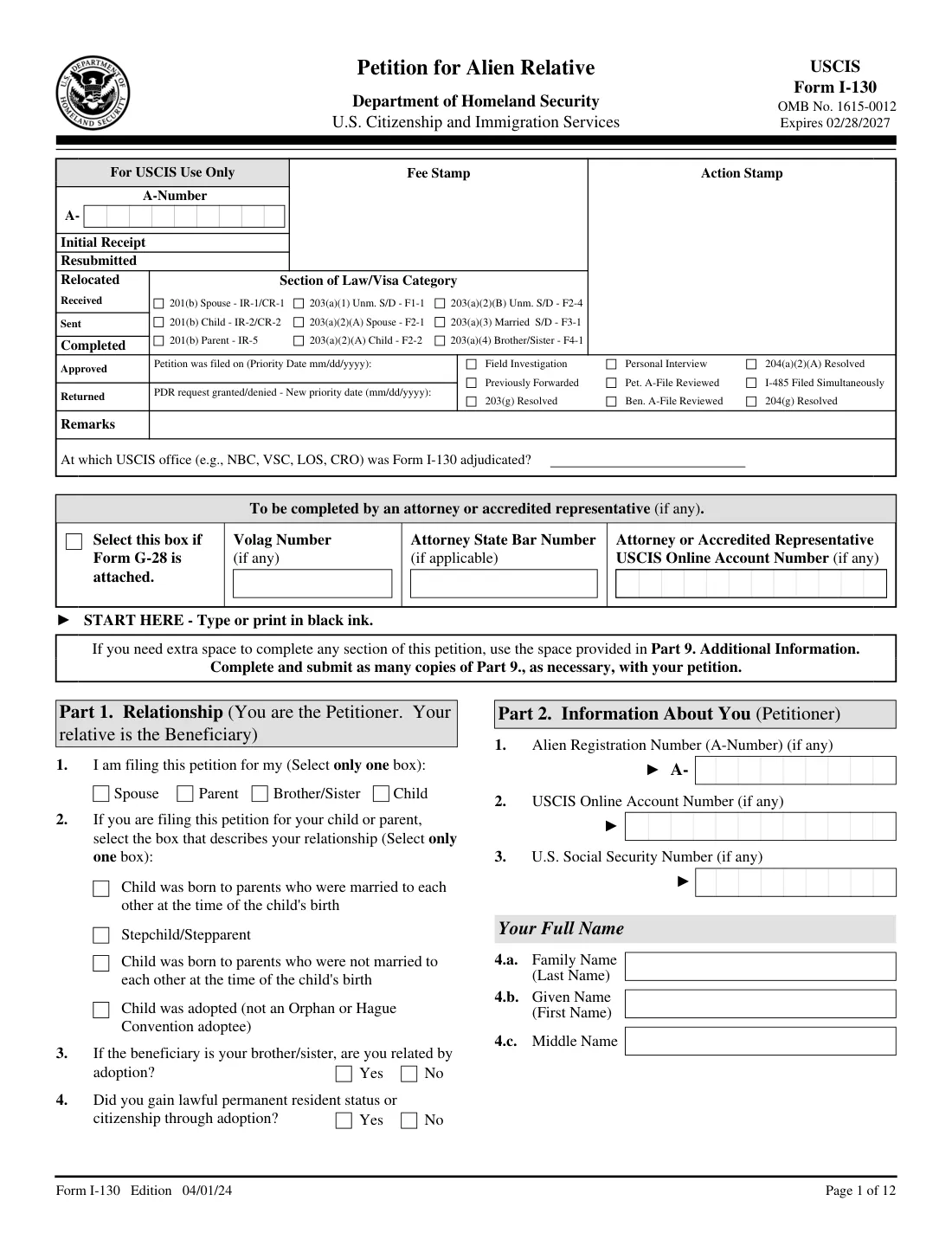
Form I-130, 12 pages. View all pages
Part 1: Relationship
You are the petitioner. Your relative is the beneficiary.
- Item Number 1.
- I am filing this petition for my: Select one box: spouse, parent, brother or sister, or child.
- Item Numbers 2. to 4.
- How you are related: For a child or parent, say whether the child was born to married parents, born to unmarried parents, is a stepchild or stepparent, or was adopted. Then answer whether a brother or sister is related by adoption and whether you got your own status through adoption.
Part 2: Information About You (Petitioner)
- Item Numbers 1. to 3.
- A-Number, USCIS Online Account Number, Social Security number: Enter these if you have them. You only have an online account number if you received a receipt number starting with IOE, and it is not the same as an A-Number.
- Item Numbers 4.a. to 9.
- Your names and birth details: Give your full name, every other name you have used, your city and country of birth, your date of birth, and your sex.
- Item Numbers 10.a. to 15.b.
- Mailing address and address history: Enter your mailing address, then every physical address you have had in the last five years, inside or outside the United States, with dates.
- Item Numbers 16. to 23.
- Your marital information: Give how many times you have married, your current status, and the date and place of your current marriage. List your current spouse first, then any prior spouses with the date each marriage ended.
- Item Numbers 24.a. to 35.
- Information about your parents: For each parent, give their name, date of birth, sex, country of birth, and current city and country of residence.
- Item Numbers 36. to 41.
- Your citizenship or permanent residence: Select US citizen or lawful permanent resident. Citizens say how they got citizenship and give certificate details if they have one. Permanent residents give their class, date, and place of admission and say whether they got status through marriage.
- Item Numbers 42. to 49.b.
- Employment history: List your jobs for the last five years, inside or outside the United States, starting with your current one. If you are unemployed, write Unemployed in Item Number 42.
Part 3: Biographic Information
- Item Numbers 1. to 6.
- Ethnicity, race, height, weight, eye color, hair color: These describe you, the petitioner. Give height in feet and inches and weight in pounds; if you don't know your weight, enter 000.
Part 4: Information About Beneficiary
- Item Numbers 1. to 10.
- Beneficiary's identity: Enter your relative's numbers (if any), names, other names, and birth details. For Item Number 10, select Unknown only if neither you nor the beneficiary knows whether anyone else has filed a petition for them.
- Item Numbers 11.a. to 16.
- Beneficiary's addresses and contact details: Give their physical address, the US address where they plan to live, and their address abroad, writing SAME where the form allows. If they live abroad in a home with no street number or name, leave 11.a. and 11.b. blank.
- Item Numbers 17. to 24.
- Beneficiary's marital information: Give how many times they have married, their current status, and the date and place of their current marriage. List their current spouse first, then any prior spouses.
- Item Numbers 25.a. to 44.
- Beneficiary's family: List the beneficiary's spouse and children, with each person's relationship, date of birth, and country of birth.
- Item Numbers 45. to 50.
- Entry information and travel documents: Say whether the beneficiary was ever in the United States. If they are there now, give their class of admission, Form I-94 number, arrival date, and when their stay expires, or D/S for duration of status. Enter passport details even if the passport has expired.
- Item Numbers 51.a. to 56.
- Employment and immigration proceedings: Give the beneficiary's current employer, even if it is outside the United States, or write Unemployed. Say whether they were ever in immigration proceedings and, if so, the type, place, and date.
- Item Numbers 57.a. to 58.f.
- Name and address in native script: If the beneficiary's native written language doesn't use Roman letters, write their name and foreign address in that language.
- Item Numbers 59.a. to 60.b.
- Last address you lived together (spouses only): If you are filing for a spouse, give the last address where you physically lived together and the dates. If you never lived together, write "Never lived together" in 59.a.
- Item Numbers 61.a. to 62.c.
- Where the beneficiary will apply: Give the USCIS office location if the beneficiary will adjust status in the United States, or the US Embassy or Consulate if they will apply for a visa abroad. Choosing a consulate outside their country of last residence doesn't guarantee it will accept the case.
Part 5: Other Information
- Item Numbers 1. to 9.
- Earlier and separate petitions: Say whether you ever filed a petition for this person or anyone else, with the name, place, date, and result. Then list any relatives you are filing separate petitions for now.
Part 6: Petitioner's Statement, Contact Information, Declaration, and Signature
- Item Numbers 1.a. to 6.b.
- Statement, contact details, and signature: Select whether you read the form in English or used an interpreter, and whether a preparer helped. Add your phone numbers and email, then sign in ink and date. A typed or stamped name is not accepted.
Part 7: Interpreter's Contact Information, Certification, and Signature
- Item Numbers 1.a. to 7.b.
- Interpreter's details and signature: Completed only if someone read the form to you in a language you are fluent in. The interpreter gives their contact details and signs.
Part 8: Person Preparing the Petition
- Item Numbers 1.a. to 8.b.
- Preparer's details and signature: Anyone who filled in the petition for you completes and signs this part. An attorney or accredited representative whose role goes beyond preparing the petition may need to file Form G-28.
Part 9: Additional Information
- Item Numbers 1.a. to 7.d.
- Extra space: Continue any answer here, noting the page, part, and item number. Put your name and A-Number at the top, and sign and date each extra sheet.
Tips for Filling Out the I-130 Form
- File a separate I-130 for each relative.
- Spouses usually also file Form I-130A with information about the beneficiary.
- Include proof of your status and of the relationship, such as birth or marriage certificates.
Fill Out Form I-130 Online
The official form opens with its fields ready to type in. Free, no sign-up, no watermark.
Official PDF on uscis.govGot Questions?
Does an approved I-130 give my relative a green card?
No. It confirms the relationship. Your relative still has to apply for a green card or an immigrant visa when one is available.
What can I send as proof that I am a US citizen or permanent resident?
A citizen can send a copy of a US birth certificate, a naturalization or citizenship certificate, a Consular Report of Birth Abroad (Form FS-240), or an unexpired US passport. A permanent resident sends a copy of the front and back of their Permanent Resident Card.
Do spouse petitions need photos?
Yes. Send two identical color passport-style photos of yourself and two of your spouse if your spouse is in the United States, taken within 30 days of filing.
What if a birth or marriage certificate is not available?
Send a statement from the civil authority saying the record is not available, plus secondary evidence such as religious, school, or census records. If those don't exist either, two or more sworn statements from people with personal knowledge of the event can be used.
I am a US national born in American Samoa. Can I file, and which box do I check?
Yes. Non-citizen US nationals have the same right as permanent residents to petition for family members. Select lawful permanent resident in Part 2, Item Number 36, and you don't need to enter an A-Number.
Can I fill out Form I-130 online for free?
Yes. Click Fill Form and Form I-130 opens in our editor with its 450 fields ready to type in. When you are done, download it as a PDF, Word file or image. There is no account to create and no watermark.
Is this the official Form I-130?
Yes. It is the official PDF from the USCIS website (Edition 04/01/24), with its own fillable fields. Forms are updated from time to time, so check the version on the USCIS website before you file.
PDFezy Reviews
No reviews yet. Used this form? Tell others how it went.