W-4 Form Guide
Form W-4 tells your employer how much federal income tax to take out of each paycheck. It looks at your filing status, other jobs in your household, children and other dependents, and other income or deductions. Fill in a new one when you start a job or when your situation changes, for example after marriage or a new child.
How to Fill Out a W-4 Form?
- 1Click Fill Form. Form W-4 opens in our editor, with its fillable fields shown in blue.
- 2Click a field to type, tick the boxes that apply, or add text, check marks and dates anywhere on the page.
- 3Click Download, choose PDF, Word or an image, name the file and save it.
What Is the W-4 Form Used For?
Your employer uses your W-4 to figure how much federal income tax to withhold from each paycheck. Getting it right matters: if too little is withheld, you will generally owe tax when you file your return and may owe a penalty, and if too much is withheld, you will generally be due a refund.
- Setting your filing status, which decides the standard deduction and tax rates used for your withholding
- Accounting for a second job, or a spouse who also works, so enough tax is withheld overall
- Lowering withholding for the child tax credit, the credit for other dependents and other credits you expect
- Having tax withheld on other income, such as interest, dividends or retirement income, or adding extra withholding each pay period
- Claiming exemption from withholding if you meet both conditions for the year
Who fills it in
Employees in the United States, when they start a job or want to change their withholding.
Where it goes
Give it to your employer, usually the HR or payroll team. It is not sent to the IRS.
When Can You Leave Parts of the W-4 Blank?
If you hold more than one job at a time, or your spouse also works, complete Steps 3 to 4(b) on the W-4 for only one of the jobs and leave them blank on the others. Your withholding will be most accurate if you fill them in on the W-4 for the highest paying job.
If you claim exemption from withholding, complete only Steps 1(a), 1(b) and 5, and leave every other step blank. The Multiple Jobs Worksheet and the Deductions Worksheet on pages 3 and 4 are marked "Keep for your records," so they stay with you.
When Should You Submit an Updated W-4?
An exemption from withholding only covers one year. If you claimed exemption for 2026, you will need to submit a new Form W-4 by February 16, 2027.
If you use the Multiple Jobs Worksheet, the IRS says to submit a new W-4 for all your other jobs if you haven't updated your withholding since 2019. The form also suggests using the IRS estimator at www.irs.gov/W4App again at the start of next year to recheck your withholding.
Instructions for Filling Out the W-4 Form
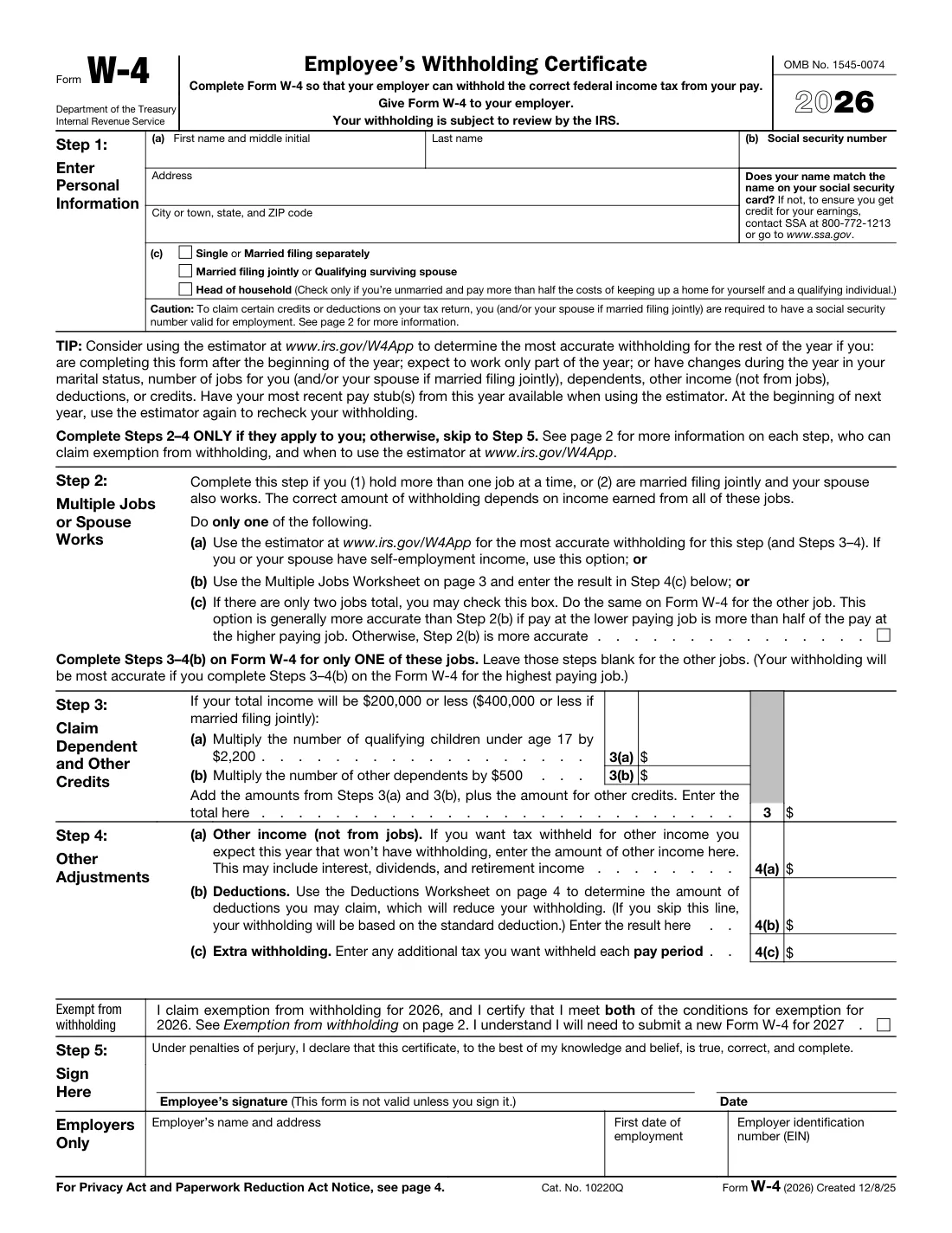
Page 1 is the certificate you give your employer. The worksheets on pages 3 and 4 help you work out some of the amounts, and the tables on page 5 go with the Multiple Jobs Worksheet.
 Get form
Form W-4, 5 pages. View all pages
Step 1: Enter Personal Information
- Step 1(a)
- Name and address: Enter your first name, middle initial and last name, then your address, city or town, state and ZIP code. If your name doesn't match your Social Security card, contact the SSA at 800-772-1213 or www.ssa.gov so you get credit for your earnings.
- Step 1(b)
- Social security number: Enter your SSN. To claim certain credits or deductions on your tax return, you (and your spouse if filing jointly) need an SSN that is valid for employment.
- Step 1(c)
- Filing status: Check the status you expect to use: Single or Married filing separately, Married filing jointly or Qualifying surviving spouse, or Head of household. Head of household is only for unmarried people who pay more than half the costs of keeping up a home for themselves and a qualifying individual.
Step 2: Multiple Jobs or Spouse Works
Do only one of the three options, and submit a separate W-4 for each job.
- Step 2(a)
- IRS estimator: Use the estimator at www.irs.gov/W4App for the most accurate withholding for this step and Steps 3 and 4. Choose this option if you or your spouse have self-employment income.
- Step 2(b)
- Multiple Jobs Worksheet: Complete the worksheet on page 3 on only one W-4 and enter the result in Step 4(c). It is a little less accurate than the estimator.
- Step 2(c)
- Two jobs checkbox: If there are only two jobs in total, you can check this box on the W-4 for both jobs. The standard deduction and tax brackets are then cut in half for each job. This is generally more accurate than Step 2(b) when the lower paying job pays more than half as much as the higher paying job; otherwise Step 2(b) is more accurate.
Step 3: Claim Dependent and Other Credits
Use this step only if your total income will be $200,000 or less ($400,000 or less if married filing jointly).
- Step 3(a)
- Qualifying children: Multiply the number of qualifying children under age 17 by $2,200. A qualifying child must be under 17 as of December 31, be your dependent who generally lives with you for more than half the year, and have the required Social Security number.
- Step 3(b)
- Other dependents: Multiply the number of other dependents by $500. This covers dependents who can't be claimed for the child tax credit, such as an older child or a qualifying relative.
- Step 3
- Total credits: Add Steps 3(a) and 3(b), plus an estimate of other credits you expect for the year, such as the foreign tax credit or education tax credits. Including credits here increases your paycheck and reduces any refund you get when you file.
Step 4: Other Adjustments (Optional)
- Step 4(a)
- Other income (not from jobs): Enter other income you expect this year that won't have tax withheld, such as interest, dividends and retirement income. Don't include income from jobs or self-employment. If you'd rather pay estimated tax on this income, see Form 1040-ES.
- Step 4(b)
- Deductions: Enter line 15 of the Deductions Worksheet if you expect to claim deductions other than the basic standard deduction and want lower withholding. If you skip this line, your withholding is based on the standard deduction.
- Step 4(c)
- Extra withholding: Enter any additional tax you want withheld each pay period, including the amount from line 4 of the Multiple Jobs Worksheet. This lowers your paycheck and either increases your refund or reduces what you owe when you file.
Exemption and Step 5: Sign Here
- Exempt from withholding
- Exemption checkbox: Check this box only if you had no federal income tax liability in 2025 and expect none in 2026. If you claim it, no income tax is withheld from your pay, and you may owe taxes and penalties when you file your 2026 return.
- Step 5
- Employee's signature and date: Sign and date the form. It isn't valid unless you sign it.
- Employers Only
- Employer details: Leave this section blank. Your employer fills in its name and address, your first date of employment and its EIN.
Worksheets (Pages 3 and 4)
- Step 2(b) Worksheet
- Multiple Jobs Worksheet: Use the tables on page 5 to find the extra annual tax for two jobs (line 1) or three jobs (lines 2a to 2c), then divide it by the number of pay periods for the highest paying job (line 3). Enter the line 4 result in Step 4(c). If more than one job pays more than $120,000 a year or there are more than three jobs, see Pub. 505 or use the estimator.
- Step 4(b) Worksheet
- Deductions Worksheet: Estimate deductions such as qualified tips, qualified overtime compensation, passenger vehicle loan interest, the amount for seniors age 65 or older, adjustments like student loan interest and deductible IRA contributions, and itemized deductions. Enter line 15 in Step 4(b). The Instructions for Schedule 1-A (Form 1040) explain who qualifies for the tips, overtime, vehicle loan interest and senior amounts.
Tips for Filling Out the W-4 Form
- Everyone fills in Step 1 (your details) and signs Step 5. Steps 2 to 4 only apply if they fit your situation.
- If you have more than one job, or your spouse works too, Step 2 helps make sure enough tax is withheld.
- Your employer keeps using your last W-4 until you give them a new one.
Fill Out Form W-4 Online
The official form opens with its fields ready to type in. Free, no sign-up, no watermark.
Official PDF on irs.govGot Questions?
Do I have to fill in every step of the W-4?
No. Everyone fills in Step 1 and signs Step 5. Steps 2, 3 and 4 are only for multiple jobs, dependents and other adjustments.
When should I give my employer a new W-4?
When you start a new job, and whenever your situation changes: marriage, divorce, a new child, a second job or a big change in income.
What happens if I don't give my employer a W-4?
If you don't provide a properly completed form, you will be treated as a single person with no other entries on the form when your withholding is figured.
Do I have to tell my employer about my other income?
You have alternatives. If you have privacy concerns about Step 2(c), you can use Step 2(b) instead, and rather than listing other income in Step 4(a), you can enter an extra amount to withhold each pay period in Step 4(c).
I'm a nonresident alien. Do I fill out the W-4 the usual way?
The IRS asks nonresident aliens to read Notice 1392, Supplemental Form W-4 Instructions for Nonresident Aliens, before completing the form.
Can my paycheck withholding cover tax on my self-employment income?
Yes, if you want it to. You generally owe both income tax and self-employment tax on that income, and the IRS suggests using the estimator at www.irs.gov/W4App to figure how much to have withheld from your wages.
Can I fill out Form W-4 online for free?
Yes. Click Fill Form and Form W-4 opens in our editor with its 48 fields ready to type in. When you are done, download it as a PDF, Word file or image. There is no account to create and no watermark.
Is this the official Form W-4?
Yes. It is the official PDF from the IRS website (2026), with its own fillable fields. Forms are updated from time to time, so check the version on the IRS website before you file.
PDFezy Reviews
No reviews yet. Used this form? Tell others how it went.