940 Form Guide
Form 940 is how employers report and pay the federal unemployment tax (FUTA) that funds unemployment benefits for workers who lose their jobs. Only employers pay this tax; it is not taken out of employees' pay.
How to Fill Out a 940 Form?
- 1Click Fill Form. Form 940 opens in our editor, with its fillable fields shown in blue.
- 2Click a field to type, tick the boxes that apply, or add text, check marks and dates anywhere on the page.
- 3Click Download, choose PDF, Word or an image, name the file and save it.
What Is the 940 Form Used For?
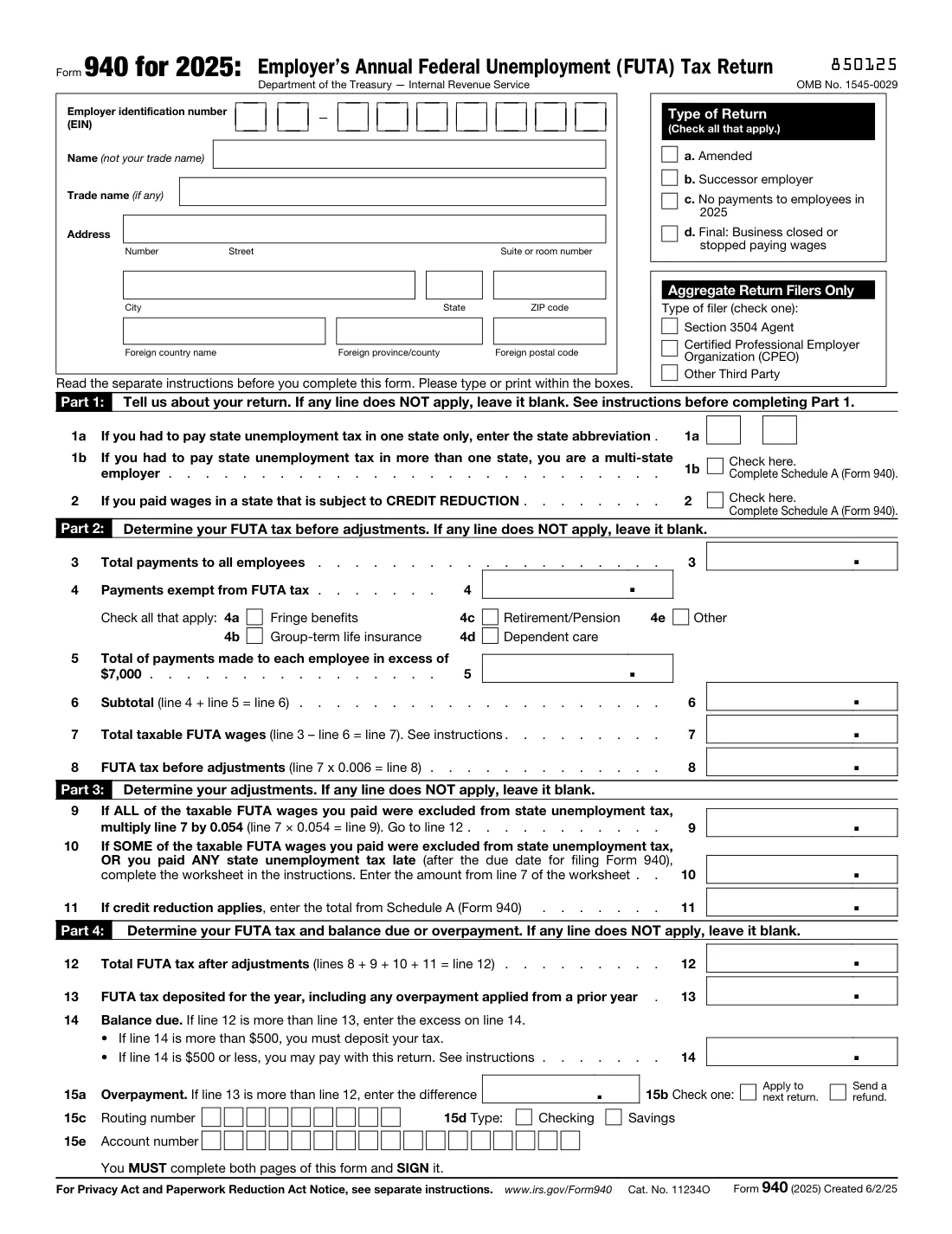
Form 940 is the yearly return where you work out your federal unemployment (FUTA) tax and compare it with the FUTA deposits you made. The tax applies only to the first $7,000 you pay each employee in a calendar year, after you subtract payments that are exempt. Most employers also pay state unemployment tax, and you generally get a credit against FUTA tax for state tax paid on time, which is why the form asks which states you paid in. This version of the form is for tax year 2025.
- Total payments to employees, minus exempt payments and pay above $7,000 per employee.
- FUTA tax before adjustments, figured as line 7 times 0.006.
- Adjustments if wages were excluded from state unemployment tax, state tax was paid late, or you paid wages in a credit reduction state.
- Your FUTA tax liability for each quarter, when the yearly total is more than $500.
- Amending a 2025 return, or marking a return as a successor employer or final return.
Who fills it in
Most employers with employees. The instructions give the exact tests.
Where it goes
File it with the IRS once a year, by January 31 for the year before (the next business day if that date falls on a weekend or holiday).
When Might You Not Need to File Form 940?
For 2025, you generally must file if either of these is true: you paid wages of $1,500 or more to employees in any calendar quarter during 2024 or 2025, or you had one or more employees for at least part of a day in 20 or more different weeks in 2024 or in 2025. Count full-time, part-time, and temporary employees, but not the partners in a partnership. Household employers and agricultural employers have their own tests in the instructions.
Some employers don't file Form 940 at all. Employers of household employees generally file Schedule H (Form 1040) instead. State and local government employers are exempt, and so are federally recognized Indian tribal government employers that took part in the state unemployment system for the full year and complied with state law. Organizations described in section 501(c)(3) and exempt under section 501(a) generally aren't subject to FUTA tax.
How Do You Amend a Form 940 After Filing?
Use the 2025 Form 940 to amend a 2025 return; for an earlier year, use that year's form. Check box a (Amended) at the top, fill in all the amounts that should have been on the original return, sign it, and attach an explanation of why you are amending, for example to claim credit for state unemployment tax paid after the due date.
The IRS encourages you to file amended returns electronically, but paper is still accepted. If you mail it, use the "Without a payment" address in the instructions, even if you include a payment. An amended aggregate return needs Schedule R (Form 940) only for the employers who have adjustments.
Instructions for Filling Out the 940 Form
Leave any line that doesn't apply blank, and put your business name and EIN on every page and attachment. Don't enter dollar signs. You may round to whole dollars, but if you do, round every entry.
 Get form
Form 940, 3 pages. View all pages
Top of Page 1: Business Information and Type of Return
- EIN, Name, and Address
- Business information: Enter your EIN and the legal business name you used on Form SS-4, adding a trade name only if it differs, and repeat your name and EIN on page 2. Don't use an SSN or ITIN. If you haven't received your EIN by the due date, write "Applied For" and the date you applied.
- Type of Return
- Boxes a to d: Check every box that applies: a (Amended), b (Successor employer), c (No payments to employees in 2025), or d (Final: business closed or stopped paying wages). If you check c, go to Part 7, sign, and file. If you check d, attach a statement with the name of the person keeping the payroll records and the address where they will be kept.
- Aggregate Return Filers Only
- Type of filer: Complete this only if you file one Form 940 that combines amounts for several employers. Check Section 3504 Agent, Certified Professional Employer Organization (CPEO), or Other Third Party. Section 3504 agents and CPEOs must attach Schedule R (Form 940).
Part 1: Tell Us About Your Return
- Line 1a
- One state only: Enter the two-letter USPS abbreviation for the state where you had to pay state unemployment tax. Complete line 1a or 1b even if your state tax rate was zero.
- Line 1b
- More than one state: If you had to pay state unemployment tax in more than one state, check this box and complete Schedule A (Form 940). Leave lines 1a and 1b blank only if all the wages you paid in every state were excluded from state unemployment tax.
- Line 2
- Credit reduction state: Check this box and complete Schedule A (Form 940) if you paid wages subject to the unemployment laws of a credit reduction state. The instructions note that there are credit reduction states for 2025.
Part 2: Determine Your FUTA Tax Before Adjustments
- Line 3
- Total payments to all employees: Enter all payments for employees' services during the year, even those that aren't taxable for FUTA. This includes salaries, wages, commissions, fees, bonuses, vacation allowances, sick pay, fringe benefits, and employer contributions to a 401(k) plan.
- Line 4
- Payments exempt from FUTA tax: Enter payments included on line 3 that are exempt from FUTA tax. Then check the boxes on lines 4a to 4e for the types: fringe benefits, group-term life insurance, retirement or pension, dependent care, or other.
- Line 5
- Payments to each employee in excess of $7,000: For each employee, figure how much you paid above $7,000 (the FUTA wage base) after subtracting that employee's exempt payments. Enter the total for all employees.
- Line 6
- Subtotal: Add lines 4 and 5.
- Line 7
- Total taxable FUTA wages: Subtract line 6 from line 3.
- Line 8
- FUTA tax before adjustments: Multiply line 7 by 0.006.
Part 3: Determine Your Adjustments
- Line 9
- All taxable FUTA wages excluded from state tax: If all the taxable FUTA wages you paid were excluded from state unemployment tax, multiply line 7 by 0.054, enter the result, and skip lines 10 and 11. This doesn't apply if you paid no state tax only because your state assigned you a 0% rate.
- Line 10
- Some wages excluded or state tax paid late: If some taxable FUTA wages were excluded from state unemployment tax, or you paid any state unemployment tax after the Form 940 due date, complete the worksheet in the instructions. Enter the amount from line 7 of the worksheet, and keep the worksheet with your records instead of attaching it.
- Line 11
- Credit reduction: If credit reduction applies, enter the total from Schedule A (Form 940).
Part 4: Determine Your FUTA Tax and Balance Due or Overpayment
- Line 12
- Total FUTA tax after adjustments: Add lines 8, 9, 10, and 11.
- Line 13
- FUTA tax deposited for the year: Enter the FUTA tax you deposited for the year, including any overpayment applied from a prior year.
- Line 14
- Balance due: If line 12 is more than line 13, enter the difference. If line 14 is more than $500, you must deposit the tax. If it is $500 or less, you may pay it with this return, using Form 940-V if you pay by check or money order.
- Lines 15a to 15e
- Overpayment: If line 13 is more than line 12, enter the difference on line 15a and check one box on line 15b to apply it to your next return or get a refund. For a refund by direct deposit, complete lines 15c to 15e with your routing number, account type, and account number.
Part 5: Report Your FUTA Tax Liability by Quarter
Fill in Part 5 only if line 12 is more than $500. Otherwise, go to Part 6.
- Lines 16a to 16d
- Quarterly liability: Enter your FUTA tax liability for each quarter, not the amount you deposited, and leave a quarter blank if you had none. To get line 16d, complete the form through line 12, copy line 12 to line 17, and subtract lines 16a to 16c from line 17.
- Line 17
- Total tax liability for the year: This is the total of lines 16a to 16d, and it must equal line 12.
Part 6: May We Speak With Your Third-Party Designee?
- Part 6
- Third-party designee: Check Yes to let an employee, your paid preparer, or another person discuss this Form 940 with the IRS, and enter their name, phone number, and a five-digit PIN they choose. Name a specific person, not a firm. The authorization covers only this form for this year and expires 1 year after the due date.
Part 7: Sign Here
- Part 7
- Signature and paid preparer: Sign and print your name and title, then add the date and your best daytime phone number. The owner signs for a sole proprietorship, the president, vice president, or another authorized principal officer for a corporation, a responsible and duly authorized partner, member, or officer for a partnership, and the fiduciary for a trust or estate. A paid preparer who isn't your employee must complete the Paid Preparer Use Only section.
Tips for Filling Out the 940 Form
- Add Schedule A if you paid wages in more than one state or in a credit reduction state.
- Deposit FUTA tax during the year once it adds up to more than $500.
- State unemployment taxes paid on time reduce the federal tax.
Fill Out Form 940 Online
The official form opens with its fields ready to type in. Free, no sign-up, no watermark.
Official PDF on irs.govGot Questions?
Who pays FUTA tax?
Only employers. It is not withheld from employees' pay.
When is the 2025 Form 940 due?
The due date for the 2025 return is February 2, 2026. If you deposited all your FUTA tax when it was due, you may file by February 10, 2026.
What is a credit reduction state?
It's a state that hasn't repaid money it borrowed from the federal government to pay unemployment benefits; the U.S. Department of Labor decides which states these are. If you paid wages subject to that state's unemployment laws, your FUTA credit is reduced, so you check line 2 and figure the extra tax on Schedule A (Form 940).
What if I didn't pay any employees in 2025?
If you aren't liable for FUTA tax for 2025 because you made no payments to employees, check box c at the top of the form, go to Part 7, sign, and file it. If you won't need to file in the future because your business closed or stopped paying wages, check box d instead.
What if I don't have my state unemployment account details?
Your state assigned you a state reporting number when you registered as an employer. If you don't have a state unemployment account and experience tax rate, or you have questions about your account, contact your state unemployment agency; the U.S. Department of Labor publishes a list of these agencies.
Can I fill out Form 940 online for free?
Yes. Click Fill Form and Form 940 opens in our editor with its 97 fields ready to type in. When you are done, download it as a PDF, Word file or image. There is no account to create and no watermark.
Is this the official Form 940?
Yes. It is the official PDF from the IRS website (2025), with its own fillable fields. Forms are updated from time to time, so check the version on the IRS website before you file.
PDFezy Reviews
No reviews yet. Used this form? Tell others how it went.