9465 Form Guide
Form 9465 asks the IRS to let you pay tax you owe in monthly payments instead of all at once. You say how much you can pay each month and on which day. Interest and penalties keep adding up until the balance is paid.
How to Fill Out a 9465 Form?
- 1Click Fill Form. Form 9465 opens in our editor, with its fillable fields shown in blue.
- 2Click a field to type, tick the boxes that apply, or add text, check marks and dates anywhere on the page.
- 3Click Download, choose PDF, Word or an image, name the file and save it.
What Is the 9465 Form Used For?
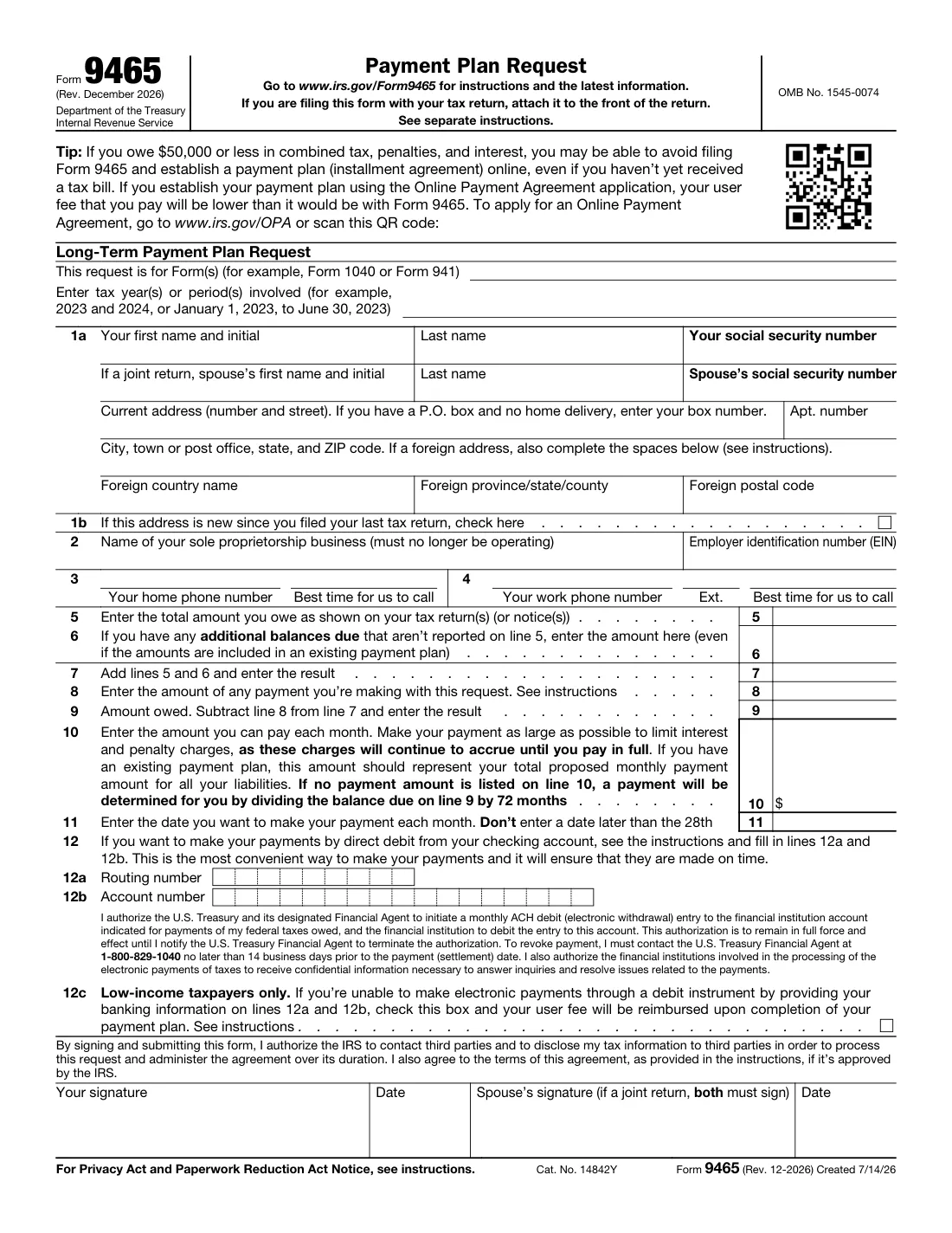
Form 9465 is how an individual asks the IRS for a monthly payment plan, also called an installment agreement, when they can't pay the full amount shown on a tax return or an IRS notice. This December 2026 revision is titled Payment Plan Request and is used to request a long-term payment plan.
- Income tax you owe on Form 1040 or 1040-SR.
- A civil penalty you are or may be responsible for, such as the trust fund recovery penalty.
- Employment taxes, such as those on Form 941, 943, or 940, from a sole proprietorship that is no longer operating.
- An individual shared responsibility payment under the Affordable Care Act.
- Balances from more than one tax year, combined in a single request.
Who fills it in
Individuals who owe tax they can't pay in full right away. A business that is still operating and owes employment taxes calls the IRS instead.
Where it goes
Send it to the IRS as the instructions describe, or apply with the IRS online payment agreement tool instead.
When Might You Not Need Form 9465?
If you can pay the full amount within 180 days, you can call the IRS at 800-829-1040 instead and avoid the fee to set up a payment plan. If you owe $50,000 or less in combined tax, penalties, and interest, you may be able to set up a plan online at IRS.gov/OPA, even if you haven't received a tax bill yet.
Don't use Form 9465 if your business is still operating and owes employment or unemployment taxes (call the number on your most recent notice instead), if you're in bankruptcy, or if the IRS is reviewing or has accepted your offer in compromise. To pay through payroll deduction, submit Form 2159 instead.
What If You Need to Change Your Payment Plan Later?
After your plan is approved, you can ask to change or end it. You may be able to change your payment amount or due date at IRS.gov/OPA, or you can call 800-829-1040.
While the plan is in place, you agree to make each payment on time, file future returns on time, and have enough withholding or estimated tax payments to pay future taxes in full. If you have a partial payment plan, the IRS may also review your finances and raise, lower, or keep your monthly amount.
Instructions for Filling Out the 9465 Form
Fill in the form from top to bottom. If you file it with your tax return, attach it to the front of the return; otherwise, mail it by itself to the IRS address for your state listed in the instructions.
 Get form
Form 9465, 1 page. View all pages
Request Details
- Top of form
- Form(s) and tax year(s): Enter the tax form the balance comes from, such as Form 1040 or Form 941, and the tax years or periods involved, for example 2023 and 2024.
Your Information
- Line 1a
- Name, SSN, and address: Enter your name, SSN, and current address. For a joint return, list both names and SSNs in the same order as on the return. If you have a foreign address, enter the city on the city line, complete the foreign address spaces, and don't abbreviate the country name.
- Line 1b
- New address: Check the box if the address on line 1a is new since you filed your last tax return.
- Line 2
- Sole proprietorship business: If this request involves your sole proprietorship, enter the business name and EIN. The business must no longer be operating.
- Line 3
- Home phone number: Enter your home phone number and the best time for the IRS to call you there.
- Line 4
- Work phone number: Enter your work phone number, any extension, and the best time to call you at work.
Amount You Owe
- Line 5
- Total amount you owe: Enter the total you owe as shown on your tax return(s) or notice(s). It can include amounts from more than one tax year.
- Line 6
- Additional balances: Enter any other balances due that aren't included on line 5, even if they're already part of an existing payment plan, including adjustments or charges not shown on a return or notice.
- Line 7
- Total balance: Add lines 5 and 6.
- Line 8
- Payment with this request: Pay as much as you can now to limit penalties and interest. If you file the form with your return, make the payment with the return. If you file it by itself, attach a check or money order payable to "United States Treasury" showing your name, address, SSN or EIN, daytime phone, and the tax year and return, and don't send cash.
- Line 9
- Amount owed: Subtract line 8 from line 7.
Your Payment Plan
- Line 10
- Monthly payment amount: Enter the most you can pay each month, since interest and penalties continue until the balance is paid. If you already have a payment plan, enter your total proposed monthly payment for all your balances. If you leave this blank, the IRS sets the payment by dividing line 9 by 72 months.
- Line 11
- Payment day: Enter the day of the month you want to pay, from the 1st to the 28th. If your request is approved, the IRS will tell you when your first payment is due.
Direct Debit
- Lines 12a and 12b
- Routing and account numbers: To pay automatically from your checking account, enter the nine-digit routing number on line 12a and your account number (up to 17 characters, without the check number) on line 12b. The direct debit won't be approved unless you, and your spouse on a joint return, sign the form.
- Line 12c
- Low-income taxpayers only: Check this box only if you're a low-income taxpayer who can't make payments by direct debit; your user fee will then be reimbursed when you complete the plan. The instructions define low-income as adjusted gross income at or below 250% of the federal poverty guidelines. Low-income taxpayers who fill in lines 12a and 12b instead have their user fees waived.
Signature
- Signature
- Your signature and date: Sign and date the form; for a joint return, both spouses must sign. By signing, you let the IRS contact third parties and share your tax information as needed to process the request, and you agree to the terms in the instructions if the plan is approved.
Tips for Filling Out the 9465 Form
- Applying online is often faster and can cost less than sending the form.
- Paying by direct debit makes missed payments less likely.
- Pay as much as you can up front to reduce interest.
Fill Out Form 9465 Online
The official form opens with its fields ready to type in. Free, no sign-up, no watermark.
Official PDF on irs.govGot Questions?
Is there a fee for an installment agreement?
Usually yes. It depends on how you apply and how you pay. The current fees are in the form's instructions.
How long does it take to hear back from the IRS?
The IRS will usually tell you within 30 days whether your request is approved or denied. It may take longer if the request is for tax due on a return you filed after March 31.
What if my chosen payment date arrives before I hear back?
You can make the first payment electronically, or mail it to the IRS service center address for your state shown in the instructions. Include the same details as for a line 8 payment, such as your name, SSN, and the tax year and return.
Will the IRS still keep my tax refunds while I'm on a payment plan?
Yes. Any refund you're due during the agreement is applied to the amount you owe, and you still need to make your regular monthly payment.
What happens if I miss a payment?
Missing a payment, or not paying a balance due on a later return, puts you in default, and the IRS may end the plan. Before it does, you may be able to appeal through the Collection Appeals Program; if the plan ends, the IRS may file a Notice of Federal Tax Lien or issue a levy to collect the full amount.
Can I fill out Form 9465 online for free?
Yes. Click Fill Form and Form 9465 opens in our editor with its 32 fields ready to type in. When you are done, download it as a PDF, Word file or image. There is no account to create and no watermark.
Is this the official Form 9465?
Yes. It is the official PDF from the IRS website (Rev. December 2026), with its own fillable fields. Forms are updated from time to time, so check the version on the IRS website before you file.
PDFezy Reviews
No reviews yet. Used this form? Tell others how it went.