
AI PDF Data Extraction
Pull the key fields and line items out of invoices, receipts and bank statements, ready for Excel.
or drop your file here
PDF, JPG or PNG up to 100 MB
- Invoices, Receipts, Statements
- Totals Check
- Excel, CSV or JSON
Extract Data from PDFs into Excel, CSV or JSON
PDFezy's AI data extractor pulls the key fields and every line item out of invoices, receipts and bank statements, even across several pages. It works on PDFs, scans and phone photos up to 100 MB. Before you download, a totals check shows whether the lines add up, and any value the AI is less sure of is highlighted. Click any value or cell to fix it, and your changes go into every download.
How to Extract Data from a PDF in 3 Steps
- 1
Upload a PDF or photo
An invoice, a receipt or a bank statement. Scans and phone photos work too.
- 2
Check the data
Low-confidence values are highlighted. Click any value or cell to fix it.
- 3
Download
Excel, CSV or JSON, with your corrections included.
Extract Data from Invoices, Receipts and Bank Statements
Invoice data extraction
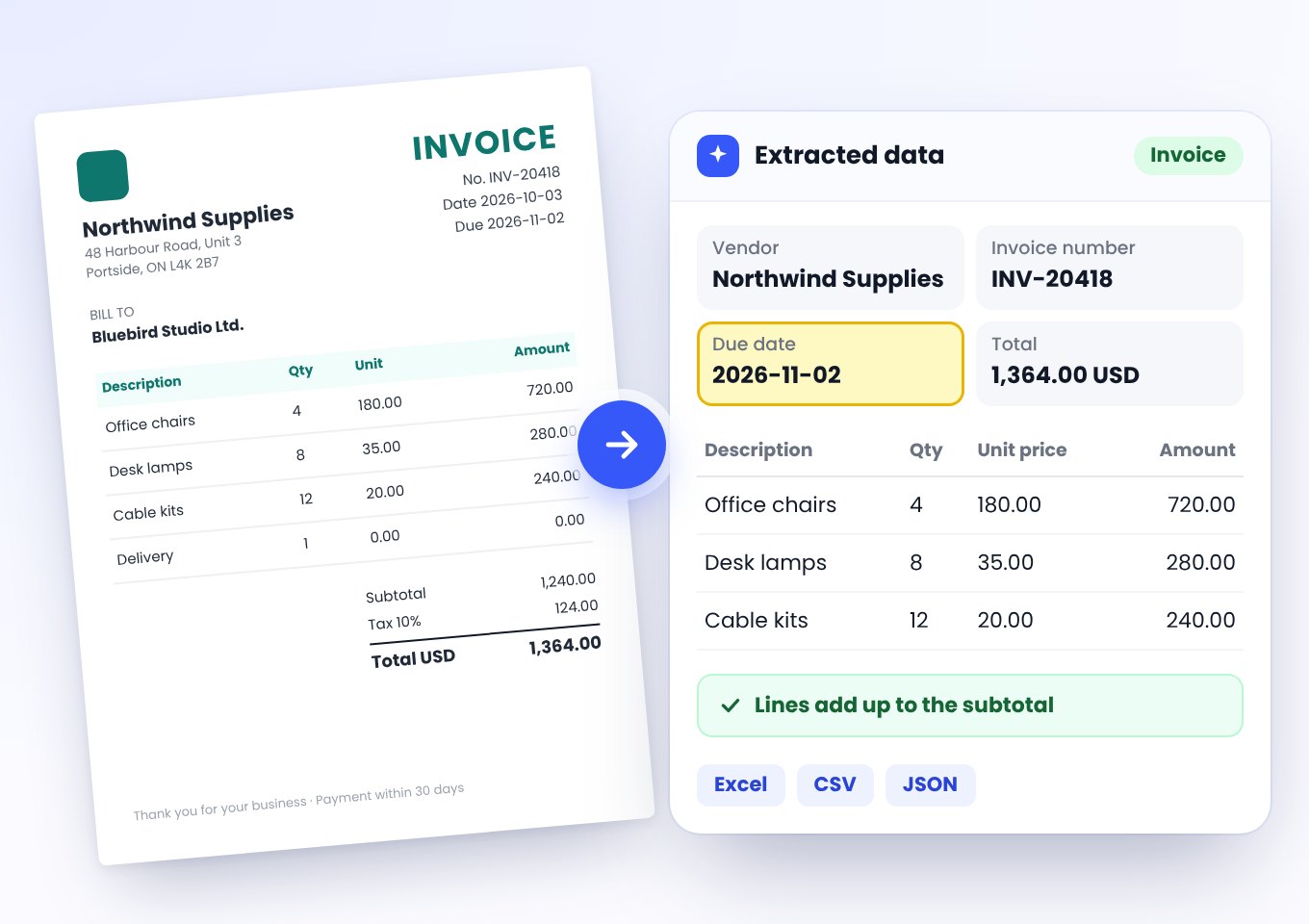
Get the supplier, invoice number, dates, totals and every line item in one table, ready for your accounting import.
Receipt data extraction
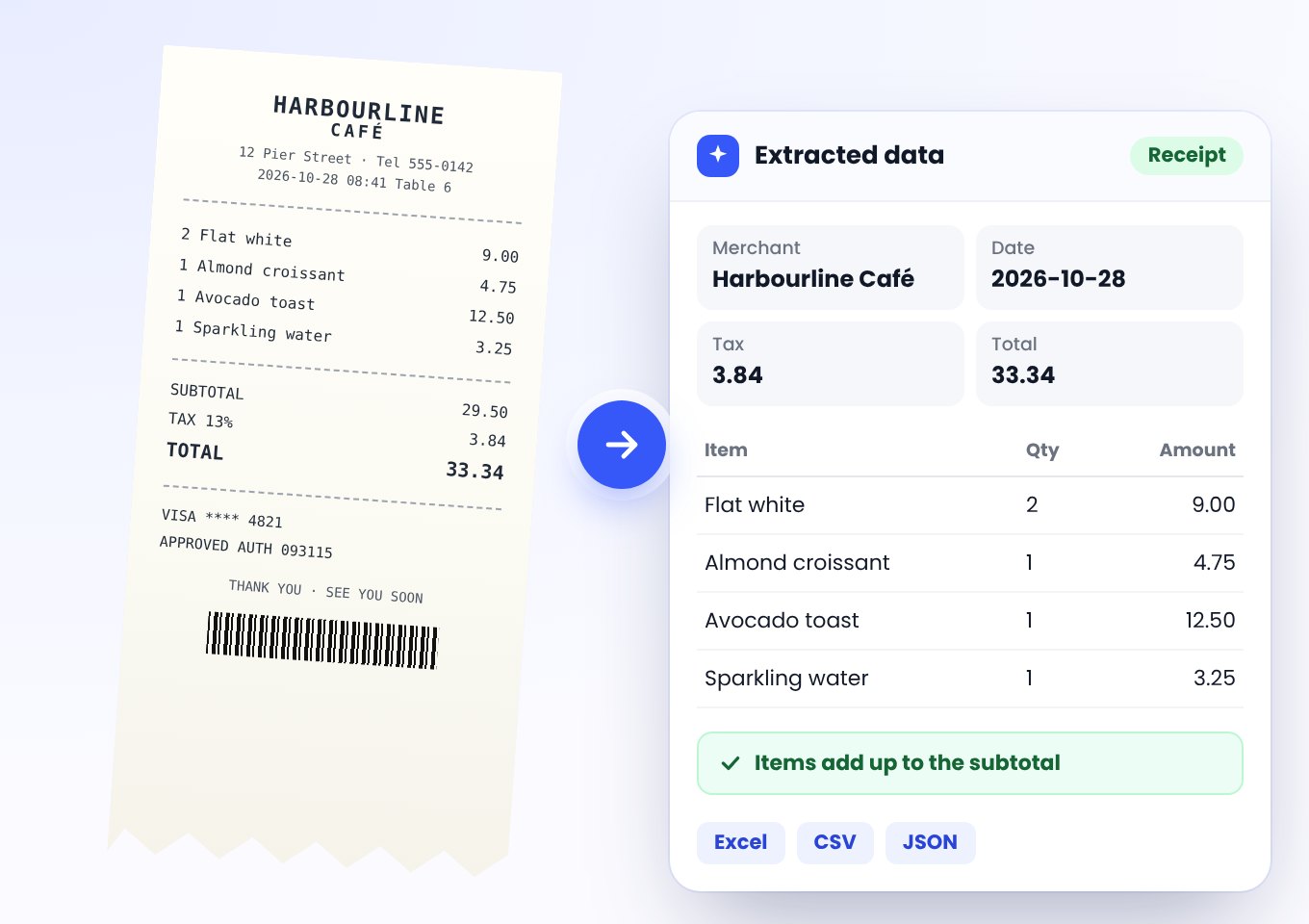
Turn paper receipts and phone photos into rows for expense reports, with merchant, date and amount.
Bank statement to Excel or CSV
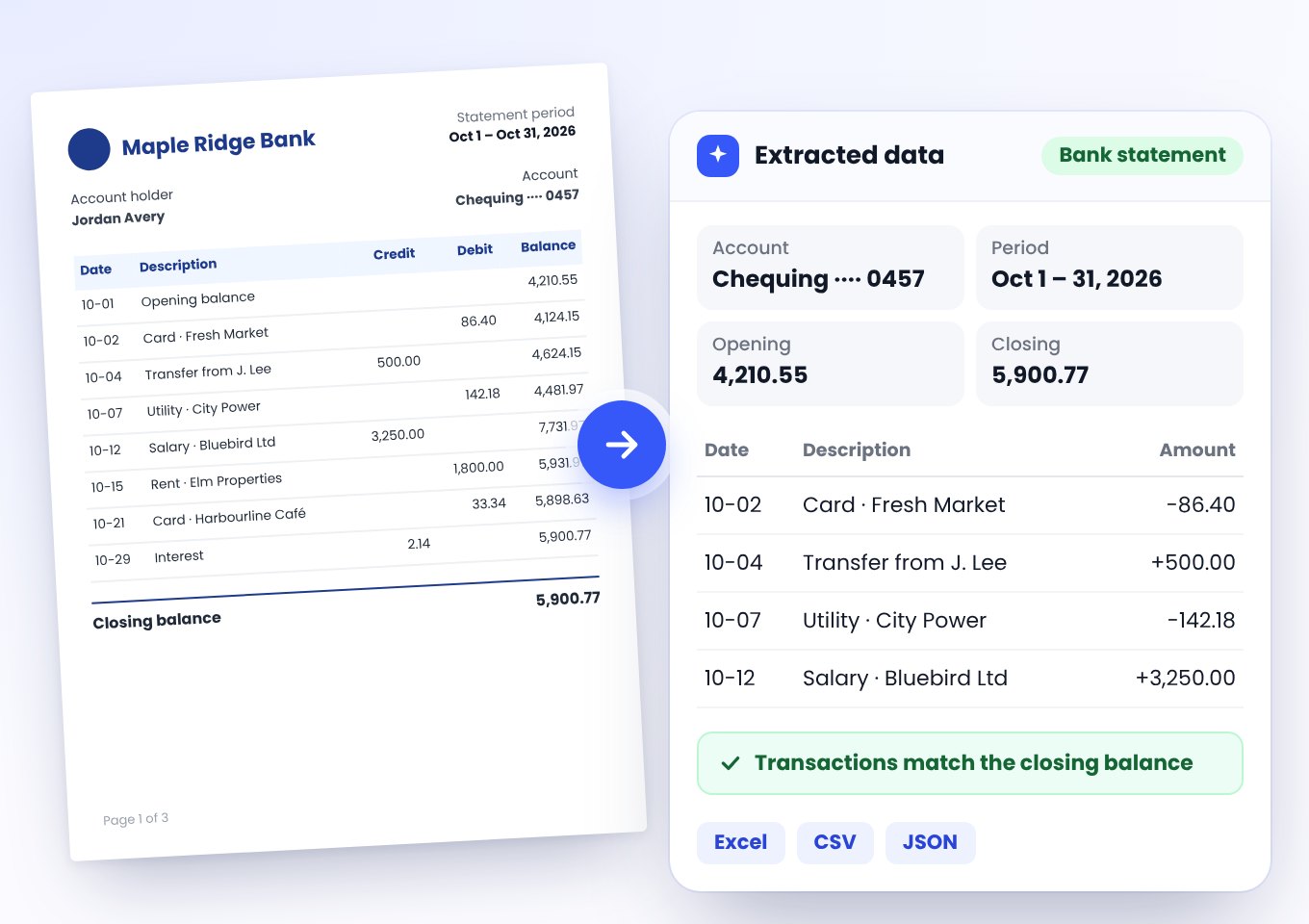
Get every transaction from a multi-page statement in one sheet, with date, description and amount. The totals check confirms nothing was dropped.
Any other PDF with a table
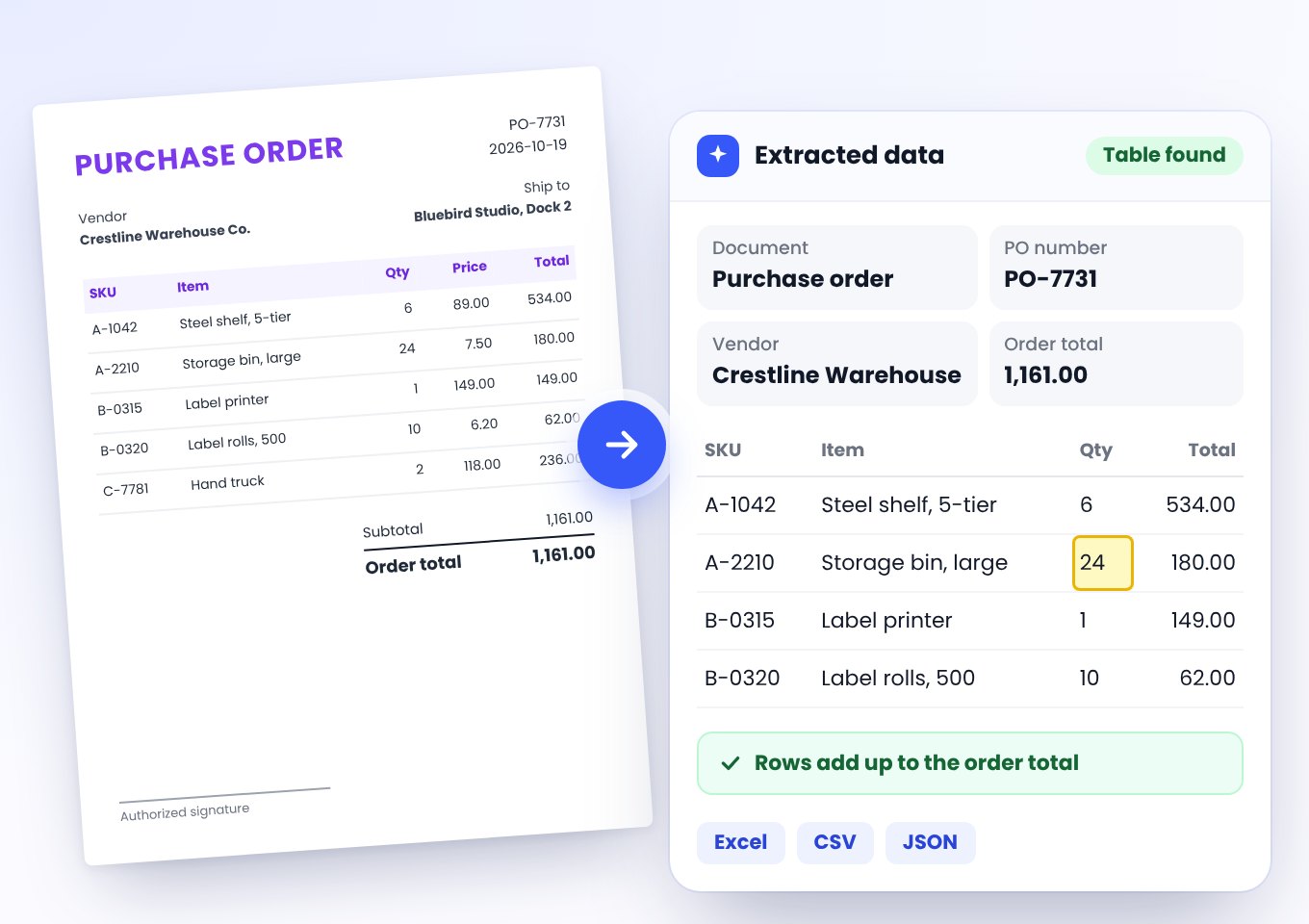
Price lists, purchase orders, reports: you get the key values and the main table.
What Data Gets Extracted
From an invoice
Fields vary by document. Receipts and statements get their own.
Key fields
- Vendor
- Invoice number
- Invoice date
- Due date
- Subtotal
- Tax
- Total
- Currency
Every line item
- Description
- Qty
- Unit price
- Amount
Download as
Excel
For spreadsheets, reconciling and reports.
CSV
For accounting imports and other software.
JSON
For developers and automations.
Check Your Data Before You Download
Extracted data you can trust before it reaches your books.
- Totals checkSee at a glance whether the line items add up.
- Highlighted valuesCheck only the values the AI is less sure of.
- Fix before you downloadClick any value or cell; your fix goes into every file.
- Vendor
- Northwind Supplies
- Invoice number
- INV-20418
- Invoice date
- 2026-10-03
- Due date · Check this value
- 2026-11-02
- Subtotal
- 1,240.00
- Tax
- 124.00
- Total
- 1,364.00
- Currency
- USD
| Description | Qty | Unit price | Amount |
|---|---|---|---|
| Office chairs | 4 | 180.00 | 720.00 |
| Desk lamps | 8 | 35.00 | 280.00 |
| Cable kits | 12 | 20.00 | 240.00 |
Lines add up to the subtotal: 1,240.00
Why Use PDFezy's AI Data Extractor
Every Line Item
Every line item, even across several pages.
Totals Check
A totals check tells you if the lines add up.
Scans and Photos
Works on scans and phone photos in JPG or PNG.
Highlighted Low-Confidence Values
See which values to double-check, instead of checking everything.
Edit Before You Download
Click any value or cell to fix it. Corrections go into every download.
Excel, CSV or JSON
Pick the format your spreadsheet, accounting software or script needs.
Multi-Page Documents
Line items that run across pages come out in one table.
Files Up to 100 MB
Long statements and large scans in one upload.
Who Uses PDF Data Extraction
Bookkeepers and accountants
Stop retyping supplier invoices; import clean rows instead.
Small business owners
Turn receipts into rows for your expense sheet.
Finance teams
Reconcile bank statements in Excel without copy-paste. Sharing one? Remove account details first with Smart Redact.
Freelancers
Track income and expenses from PDF invoices for tax time.
Operations and purchasing
Pull purchase order and price list tables into your system.
Developers
Get JSON from documents for automations.
Data Extraction or PDF to Excel?
Pick the tool that fits what you need from the file.
You want
Specific fields and line items from invoices, receipts or statements, checked against the total
You're in the right place
You want
The whole PDF turned into a spreadsheet, page by page
Use PDF to ExcelYou want
Searchable, editable text from a scan
Use PDF OCR
PDFezy vs LightPDF and Docparser
PDFezy checks your totals and shows you what to double-check before you download.
| Feature | PDFezy | LightPDF | Docparser |
|---|---|---|---|
| Totals check | Yes, on every document | Not stated | Not stated |
| Highlights uncertain values | Yes | Not stated | Not stated |
| Edit before you download | Yes, click any value or cell | Not stated | Not stated |
| Setup | None, just upload | Not stated | Templates and parsing rules |
| Scans and photos | Yes, PDF, JPG or PNG | Yes, PDF and images | Yes, native or scanned PDFs |
| Long documents | Up to 100 MB; reads the first 50 pages (15 if scanned) | Not stated | Up to 50 pages |
PDF Data Extraction FAQs
How do I extract data from a PDF?
It takes three steps:
- Upload a PDF or a photo of an invoice, receipt or bank statement.
- Check the highlighted values and click any value or cell to fix it.
- Download Excel, CSV or JSON, with your corrections included.
Which documents work?
Invoices, receipts and bank statements in PDF, JPG or PNG.
Other documents work too: you get the key values and the main table.
Can I convert an invoice to Excel?
Yes. You get the invoice fields and every line item in an Excel sheet.
Can I convert a bank statement to Excel or CSV?
Yes. Every transaction comes out in one table, even across several pages.
Does it work on scanned PDFs and photos?
Yes. Scans and phone photos in JPG or PNG work too. For searchable text from a scan, use PDF OCR.
How accurate is it?
Numbers are copied as printed, and a totals check shows whether the lines add up.
Values the AI is less sure of are highlighted so you can check them.
What is the totals check?
It adds up the extracted lines and tells you whether they match the document's total.
Can I fix mistakes before downloading?
Yes. Click any value or table cell to change it. Your changes are in every download.
What file formats can I download?
Excel, CSV or JSON, with your corrections included.
How large can my file be?
Up to 100 MB.
What's the difference from PDF to Excel?
Data Extraction picks out fields and line items and checks totals. PDF to Excel converts whole pages into a spreadsheet.
Need another format?
PDFezy has 50+ PDF tools for converting, editing and signing.