1040-X Form Guide
Form 1040-X fixes mistakes or changes on a Form 1040 you already filed: income you left out, a deduction or credit you missed, or the wrong filing status. For each line you show the original amount, the change and the corrected amount, and explain why.
How to Fill Out a 1040-X Form?
- 1Click Fill Form. Form 1040-X opens in our editor, with its fillable fields shown in blue.
- 2Click a field to type, tick the boxes that apply, or add text, check marks and dates anywhere on the page.
- 3Click Download, choose PDF, Word or an image, name the file and save it.
What Is the 1040-X Form Used For?
Form 1040-X is the IRS form for changing a federal individual income tax return after it has been filed. It works out your corrected tax and then compares it with what you have already paid and been refunded, so you can see whether you owe more or are due an additional refund.
- Correct a Form 1040, 1040-SR, or 1040-NR you already filed.
- Change amounts the IRS previously adjusted. Don't include interest or penalties; the IRS adjusts those itself.
- Make certain elections after the normal deadline.
- Claim a carryback due to a loss or unused credit.
- Fix a return filed on the wrong form, such as Form 1040-NR when you should have filed Form 1040.
Who fills it in
Anyone who needs to change a federal individual income tax return after filing it.
Where it goes
File it with the IRS. Many amended returns can be filed electronically; otherwise mail it as the instructions say.
When Might You Not Need Form 1040-X?
Form 1040-X is only for a return you have already filed. If you haven't filed yet, file your original return instead.
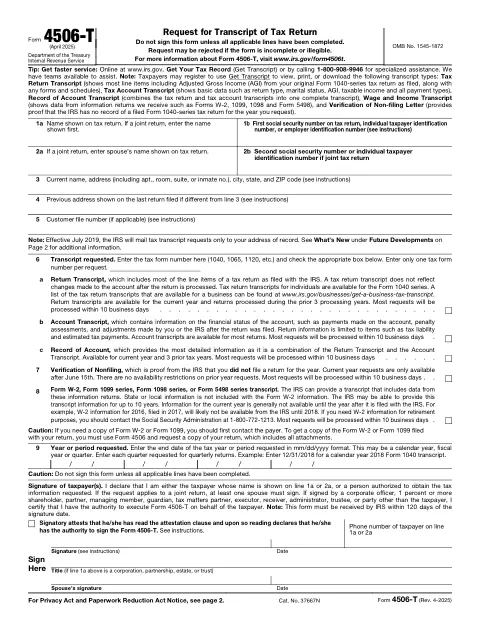
Some requests use a different form. To ask only for a refund of penalties and interest (or an addition to tax) that you already paid, use Form 843. To get back your share of a joint refund that was applied to your spouse's past-due debt, use Form 8379. For a loss or credit carryback, you may be able to use Form 1045 instead.
What If You Need to Change Your Return Again?
You can file Form 1040-X more than once for the same year, as long as each one is filed on time. On the new form, column A should show the amounts as already changed by your earlier amended return, an audit, or an IRS notice, not the amounts from your original return.
Some choices can't be undone. If you applied part of an overpayment to next year's estimated tax, on your original return or on line 23, you can't reverse that election later. You also generally can't switch from a joint return to separate returns after the original due date.
Instructions for Filling Out the 1040-X Form
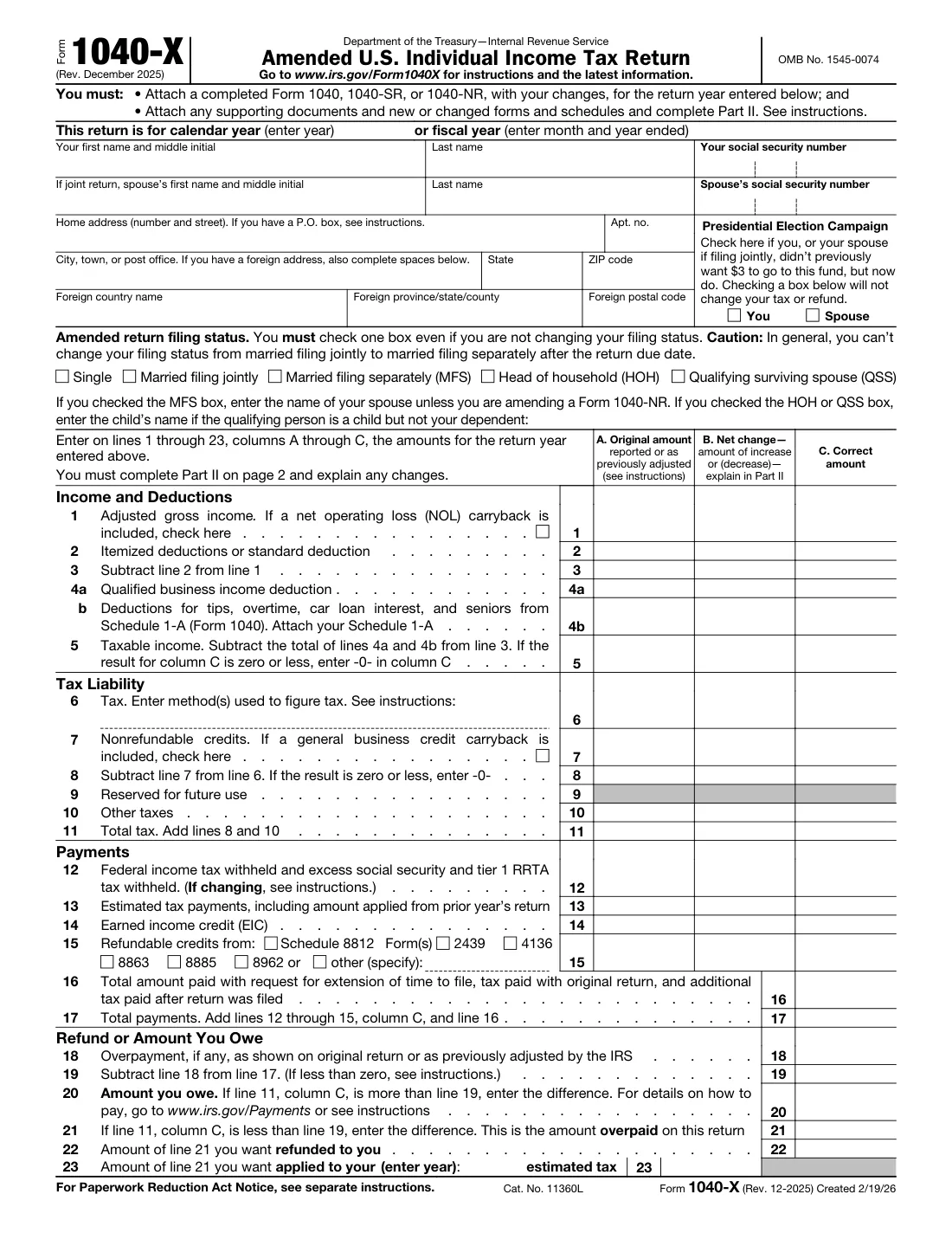
Always complete the top of page 1 through the filing status, then fill in only the lines your change affects, plus Part II and the signature area. The instructions include a chart: for example, a change to income means completing lines 1 through 23, while a change only to payments means lines 11 through 23.
 Get form
Form 1040-X, 2 pages. View all pages
Top of Page 1
- Return year
- Calendar year or fiscal year: Enter the calendar year of the return you are amending, or the month and year your fiscal year ended.
- Name and address
- Your name, SSN, and current address: If you're amending a joint return, list your names and SSNs in the same order as on the original. If you're changing from a separate return to a joint return and your spouse didn't file, enter your name and SSN first. If you have moved, enter your current address.
- Presidential Election Campaign
- New $3 designation: Check a box only if you, or your spouse on a joint return, didn't choose to send $3 to the fund before but want to now. This must be done within 20½ months after the original due date, and an earlier designation can't be undone.
- Amended return filing status
- Check one box: Check your filing status even if you aren't changing it. In general, you can't change from married filing jointly to married filing separately after the due date. If you check married filing separately, enter your spouse's name; for head of household or qualifying surviving spouse, enter the child's name if the qualifying child isn't your dependent.
- Columns A to C
- Original amount, net change, correct amount: In column A, enter the amount from your original return, or as later adjusted by you or the IRS. In column B, enter the increase or decrease, showing decreases and losses in parentheses. In column C, add or subtract column B from column A; for lines you aren't changing, copy column A.
Income and Deductions
- Line 1
- Adjusted gross income: Show your AGI, which reflects any change to your income or adjustments. A change to AGI can change other items, such as certain credits, the taxable part of social security benefits, and itemized deductions, so refigure those too. Check the box if an NOL carryback is included.
- Line 2
- Itemized deductions or standard deduction: If you itemize, enter your Schedule A total, and attach a corrected Schedule A if you're switching to itemizing or changing a deduction. If you take the standard deduction, use the amount for your filing status for the year you're amending.
- Lines 3 to 5
- Other deductions and taxable income: Line 4a is the qualified business income deduction, and line 4b is deductions for tips, overtime, car loan interest, and seniors from Schedule 1-A, which you must attach. If your original taxable income was $0 and you're changing line 1, 2, or 4b, enter the actual (possibly negative) taxable income in column A of line 5. If column C of line 5 is zero or less, enter -0-.
Tax Liability
- Line 6
- Tax: Figure the tax on the line 5, column C amount, usually by the same method as your original return, and include the amount you reported on Schedule 2, line 3. Enter the method you used in the space on line 6, such as Table, TCW, Sch D, Sch J, QDCGTW, FEITW, or F8615.
- Line 7
- Nonrefundable credits: Enter your total nonrefundable credits, and refigure them if you changed anything on lines 1 to 6. Attach the forms for any credits you add or change, and check the box if a general business credit carryback is included.
- Lines 8 to 11
- Other taxes and total tax: Line 8 subtracts credits from tax. Line 9 is reserved, so leave it blank. Enter other taxes from Schedule 2 on line 10, and add lines 8 and 10 for your total tax on line 11.
Payments
- Line 12
- Withholding: Enter federal income tax withheld and any excess social security and tier 1 RRTA tax withheld. If this is changing, attach any new or corrected Forms W-2, and Forms 1099-R showing withholding, to the front of Form 1040-X.
- Lines 13 to 15
- Estimated tax and refundable credits: Enter estimated tax payments on line 13, including any prior-year overpayment applied to this year. Enter the earned income credit on line 14, attaching Schedule EIC if you're now claiming it with a qualifying child. On line 15, check the box for each refundable credit and write in any others after "other (specify)".
- Lines 16 and 17
- Amounts already paid and total payments: On line 16, enter tax paid with an extension request, with your original return, and after you filed. Don't include interest, penalties, or any convenience fee you were charged. Line 17 totals your payments.
Refund or Amount You Owe
- Lines 18 and 19
- Earlier overpayment: On line 18, enter the overpayment from your original return, plus any extra overpayment from an IRS change, but not interest you received. Subtract it from line 17 on line 19. If line 19 is negative, you owe tax: treat it as a positive number, add it to line 11, and enter the result on line 20.
- Line 20
- Amount you owe: The IRS recommends paying electronically; see IRS.gov/Payments. If you file on paper and pay by check or money order, enclose the payment in the envelope, but don't attach it to the form.
- Lines 21 to 23
- Overpayment, refund, and estimated tax: Line 21 shows any new overpayment. Enter the part you want refunded on line 22, which is sent separately from any refund on your original return. Enter the part you want applied to next year's estimated tax on line 23, with the year; no interest is paid on it.
Part I: Dependents
Complete this part only if your dependent information is changing.
- Lines 25 and 27
- Number of dependents: Use columns A to C to show the original, change, and correct number of dependent children who lived with you more than half the year (line 25) and other dependents (line 27). Lines 24, 26, 28, and 29 are reserved; leave them blank.
- Line 30
- List all dependents: List every dependent claimed on the amended return, both those already on your original return and any you're adding, with their names, SSNs, relationship, and the checkboxes in rows (5) to (7).
Part II and Signature
- Part II
- Explanation of changes: You must tell the IRS why you're filing, for example that you received another Form W-2 after filing or forgot to claim a credit. Attach a statement if you need more space.
- Sign Here
- Signatures, occupation, and IP PIN: Sign and date the form and enter your occupation; on a joint amended return, both spouses must sign. A paper Form 1040-X needs a handwritten signature. If the IRS sent you an Identity Protection PIN, enter it in the space provided.
Tips for Filling Out the 1040-X Form
- Use a separate 1040-X for each year you are correcting.
- Explain each change in Part II and attach any forms or schedules that changed.
- To claim a refund, you generally have 3 years from when you filed the original return, or 2 years from when you paid the tax, whichever is later.
Fill Out Form 1040-X Online
The official form opens with its fields ready to type in. Free, no sign-up, no watermark.
Official PDF on irs.govGot Questions?
Do I need to amend my return for a math mistake?
Usually not. The IRS corrects math errors itself. Amend when your income, deductions, credits or filing status change.
How long does it take the IRS to process Form 1040-X?
Generally allow 8 to 12 weeks, though some take up to 16 weeks. You can follow it with the Where's My Amended Return tool on IRS.gov, but it can take up to 3 weeks after you mail it to appear there.
Can my amended return refund be directly deposited?
Only if you file Form 1040-X electronically for tax year 2021 or later. A refund from a paper-filed amended return comes as a check.
Do I need to send a new Form 1040 with my amended return?
Yes, if you file on paper. Place a completed, updated Form 1040, 1040-SR, or 1040-NR showing your changes behind Form 1040-X, followed by any new or changed schedules. Don't attach a copy of your original return unless you're asked to.
Will I need to amend my state return too?
Possibly. The IRS instructions note that if you change your federal return, you may also need to change your state return.
Can I fill out Form 1040-X online for free?
Yes. Click Fill Form and Form 1040-X opens in our editor with its 166 fields ready to type in. When you are done, download it as a PDF, Word file or image. There is no account to create and no watermark.
Is this the official Form 1040-X?
Yes. It is the official PDF from the IRS website (Rev. December 2025), with its own fillable fields. Forms are updated from time to time, so check the version on the IRS website before you file.
PDFezy Reviews
No reviews yet. Used this form? Tell others how it went.