2553 Form Guide
Form 2553 lets an eligible corporation or LLC choose to be taxed as an S corporation. Profits and losses then pass through to the owners' personal tax returns instead of being taxed at the company level. Every shareholder must consent by signing.
How to Fill Out a 2553 Form?
- 1Click Fill Form. Form 2553 opens in our editor, with its fillable fields shown in blue.
- 2Click a field to type, tick the boxes that apply, or add text, check marks and dates anywhere on the page.
- 3Click Download, choose PDF, Word or an image, name the file and save it.
What Is the 2553 Form Used For?
Form 2553 is how a domestic corporation, or a domestic entity eligible to be treated as a corporation, makes the election under section 1362(a) to be an S corporation. An S corporation's income is generally taxed to its shareholders, although the corporation may still owe tax on certain income. The IRS accepts the election only if every test under Who May Elect in the instructions is met, all required shareholders have signed, and an officer has signed.
- Choose the date the S election takes effect and the tax year the corporation will use.
- Request a fiscal tax year in Part II instead of a calendar year.
- Collect each shareholder's signed consent to the election.
- Request relief for a late election under Rev. Proc. 2013-30.
- Make a qualified subchapter S trust (QSST) election in Part III.
Who fills it in
Eligible US corporations and LLCs that want S corporation tax status, and their shareholders.
Where it goes
Mail or fax it to the IRS address in the instructions for your state.
When Might Form 2553 Not Be the Right Form?
Form 2553 only works for entities that pass every test under Who May Elect. For example, an entity can't elect if it has a nonresident alien shareholder, more than one class of stock, or a shareholder that isn't an individual, an estate, certain trusts or certain exempt organizations. Some corporations are ineligible outright, such as certain banks and thrift institutions, insurance companies taxed under subchapter L, and current or former DISCs.
An eligible entity that meets the tests doesn't need to file Form 8832 first, because it is treated as a corporation as of the S election's effective date. And if a parent S corporation wants to treat a wholly owned subsidiary as a qualified subchapter S subsidiary, that election is made on Form 8869, not Form 2553.
What Happens After You File Form 2553?
The IRS service center will tell the corporation whether its election is accepted and when it takes effect, generally within 60 days of filing. If you checked box Q1, it generally takes an additional 90 days. If you hear nothing within 2 months of filing (5 months if box Q1 is checked), the instructions say to follow up by calling 1-800-829-4933.
Don't file Form 1120-S for any year before the election takes effect; keep filing Form 1120 or your other required return until then. Once made, the election stays in effect until it is terminated or revoked. After that, the IRS generally must consent to a new election for any tax year before the 5th tax year after the first tax year in which the termination or revocation took effect.
Instructions for Filling Out the 2553 Form
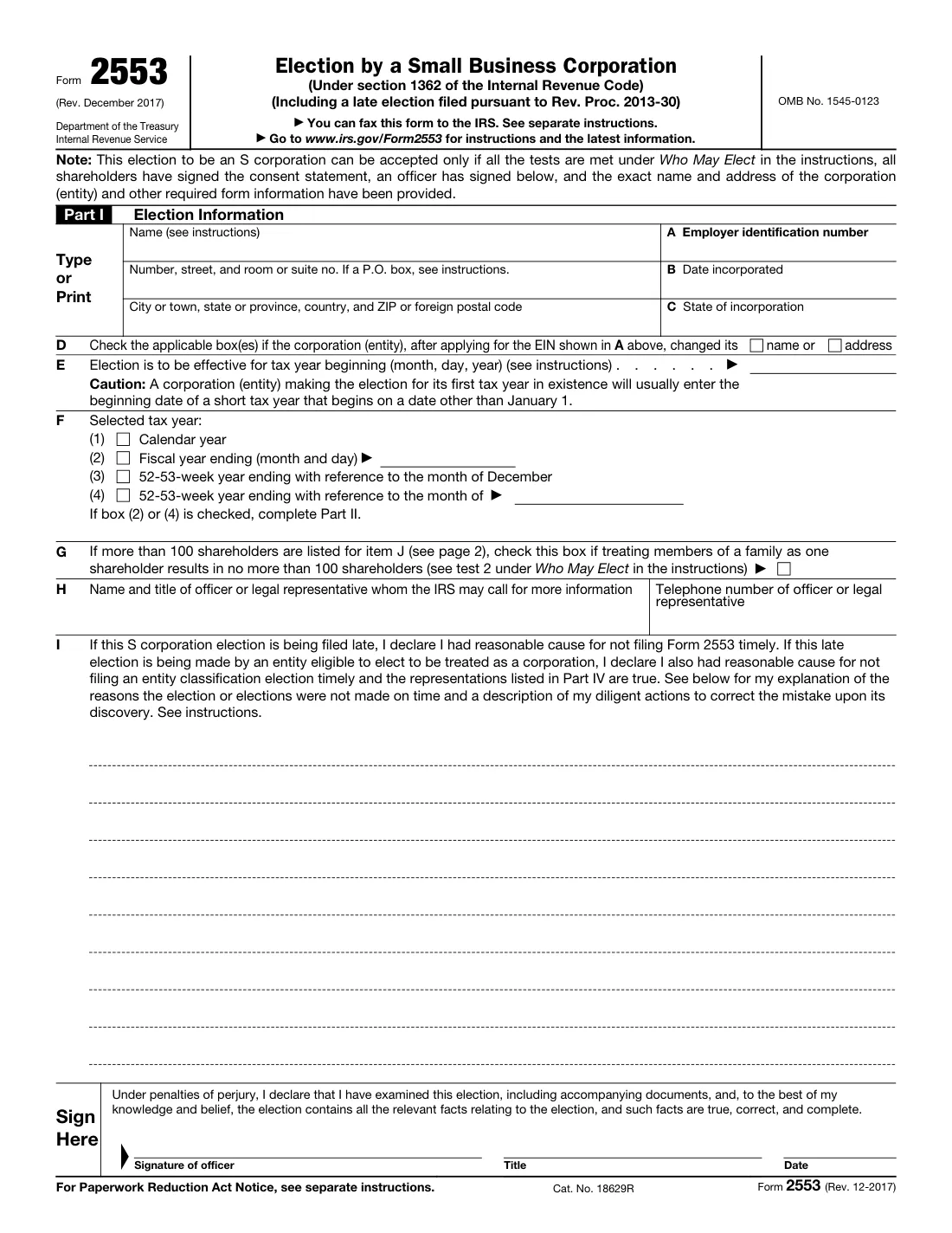
Every election uses Part I, which runs across pages 1 and 2. Complete Part II only if you chose a fiscal year in item F, Part III only for a QSST election, and Part IV only for a late entity classification election.
 Get form
Form 2553, 4 pages. View all pages
Part I: Election Information
- Name and address
- Corporation's name and address: Enter the corporation's or entity's true name as shown in its charter or other legal document that created it. If its mailing address is the same as someone else's, such as a shareholder's, add "C/O" and that person's name. Use a P.O. box only if the Post Office doesn't deliver to the street address.
- Item A
- Employer identification number: Enter the entity's EIN. If it doesn't have one, it must apply online at IRS.gov/EIN or with Form SS-4. If the EIN hasn't arrived by the time the form is due, write "Applied For" and the date you applied.
- Items B and C
- Date and state of incorporation: Enter the date the corporation was incorporated and the state where it was incorporated.
- Item D
- Name or address change: Check the name box, the address box or both if either changed after the entity applied for the EIN shown in item A.
- Item E
- Effective date of election: Enter the first day of the tax year the election should start. For a first tax year, use the earliest date the entity had shareholders, had assets or began doing business, which is usually not January 1. An existing entity keeping its current tax year enters the first day of the first year it wants S status.
- Item F
- Selected tax year: Check the box for the tax year the S corporation will use: calendar year, a fiscal year, or a 52-53-week year. If you check box (2) or (4), enter the month (and day for box 2) and complete Part II.
- Item G
- Family members as one shareholder: Check this box only if item J lists more than 100 shareholders, but treating members of a family as one shareholder brings the total to 100 or fewer.
- Item H
- Contact person: Enter the name, title and phone number of an officer or legal representative the IRS can call for more information.
- Item I
- Late election explanation: If you are filing late, explain the reasonable cause for missing the deadline and the steps you took to fix the mistake once you found it. Also write "FILED PURSUANT TO REV. PROC. 2013-30" in the top margin of page 1.
- Signature
- Officer's signature: The president, vice president, treasurer, assistant treasurer, chief accounting officer or another authorized officer signs, dates and enters a title. An unsigned Form 2553 is not considered timely filed.
- Column J
- Shareholders who must consent: List the name and address of each shareholder or former shareholder who must consent. If you file before the item E date, that means shareholders who own stock on the day you file; if you file on or after it, include everyone who owned stock at any time from the item E date to the filing date. For stock held by a nominee, guardian, custodian or agent, list the person the stock is held for.
- Column K
- Shareholder's consent statement: Each shareholder signs and dates here or on a separate consent statement attached to the form. Spouses with a community interest in the stock must both consent, each joint tenant, tenant in common and tenant by the entirety must consent, and an estate consents through its executor or administrator.
- Column L
- Stock owned or percentage of ownership: Enter the number of shares each shareholder owns on the date the election is filed and the date or dates acquired. An entity without stock, such as an LLC, enters each owner's percentage of ownership. Enter -0- for former shareholders.
- Column M
- Social security number or EIN: Enter the Social Security number of each individual shareholder, or the EIN of each estate, qualified trust or exempt organization.
- Column N
- Shareholder's tax year end: Enter the month and day each shareholder's tax year ends. If a shareholder is changing tax years, enter the new one and attach an explanation of the present tax year and the basis for the change.
Part II: Selection of Fiscal Tax Year
Complete this part only if you checked box (2) or (4) in item F. Every corporation using it completes item O and one of items P, Q or R.
- Item O
- Type of corporation: Check whether the corporation is new and adopting the item F tax year, existing and keeping it, or existing and changing to it.
- Item P
- Automatic approval: Check box P1 for a natural business year or box P2 for an ownership tax year under Rev. Proc. 2006-46. For P1, attach a statement of gross receipts for each of the most recent 47 months; a corporation without 47 months of receipts can't use P1.
- Item Q
- Business purpose request: Check box Q1 to request a fiscal year based on a business purpose and attach a statement of the relevant facts. A user fee applies, but don't pay it with the form; the IRS will notify the corporation when it is due. Box Q2 adds a back-up section 444 election, and box Q3 agrees to a December 31 year if needed for the S election to be accepted.
- Item R
- Section 444 election: Check box R1 if the corporation will make a section 444 election, and file Form 8716 either attached to Form 2553 or separately. Check box R2 to agree to a December 31 year if the corporation turns out not to qualify.
Part III: Qualified Subchapter S Trust (QSST) Election
Use this part only together with the election in Part I. Form 2553 can't be filed with only Part III completed.
- Beneficiary and trust
- Names, addresses and numbers: Enter the income beneficiary's name, address and Social Security number, and the trust's name, address and EIN.
- Transfer date
- Date stock was transferred to the trust: Enter the date the corporation's stock was transferred to the trust. Part III can be used only if that date is on or before the date of the S election; otherwise, the QSST election must be made and filed separately.
- Signature
- Income beneficiary's signature: The income beneficiary, or a legal representative or other qualified person, signs and dates the election. The trust's deemed owner must also consent to the S election in column K.
Part IV: Late Corporate Classification Election Representations
These statements apply when a late entity classification election was meant to take effect on the same date as a late S election.
- Lines 1 to 4
- Eligibility and reasons for lateness: These lines state that the entity is an eligible entity, intended to be a corporation as of the S election's effective date, and missed corporate and S status only because Form 8832 and Form 2553 were not filed on time.
- Lines 5a and 5b
- Returns filed: Line 5a states that the entity filed all required returns consistent with S corporation status and no inconsistent returns. Line 5b applies instead if the first year's return isn't due yet.
Tips for Filling Out the 2553 Form
- To take effect for the current tax year, it generally has to be filed within 2 months and 15 days after the year starts.
- Every shareholder must sign the consent statement.
- Check the eligibility rules first, such as the limit of 100 shareholders.
Fill Out Form 2553 Online
The official form opens with its fields ready to type in. Free, no sign-up, no watermark.
Official PDF on irs.govGot Questions?
Can an LLC file Form 2553?
Yes. An eligible LLC can elect S corporation status with Form 2553, and is then treated as having chosen to be taxed as a corporation too.
What if we missed the filing deadline?
You may still be able to get relief for a late election under Rev. Proc. 2013-30. Requirements include reasonable cause for filing late, acting diligently to fix the mistake and, generally, filing within 3 years and 75 days of the item E date. If you don't meet the requirements, you generally must request a private letter ruling instead.
Can we fax Form 2553 to the IRS?
Yes. If you fax it, keep the original with the corporation's permanent records. If you mail it, send the original rather than a photocopy.
What counts as proof that we filed Form 2553?
The instructions accept a timely postmarked certified or registered mail receipt (or the equivalent from a designated private delivery service), a Form 2553 with an accepted stamp or a stamped IRS received date, or an IRS letter saying the election was accepted.
Can a shareholder withdraw their consent later?
No. The consent statement on the form says a shareholder's consent is binding and can't be withdrawn after the corporation has made a valid election.
Can I fill out Form 2553 online for free?
Yes. Click Fill Form and Form 2553 opens in our editor with its 100 fields ready to type in. When you are done, download it as a PDF, Word file or image. There is no account to create and no watermark.
Is this the official Form 2553?
Yes. It is the official PDF from the IRS website (Rev. December 2017), with its own fillable fields. Forms are updated from time to time, so check the version on the IRS website before you file.
PDFezy Reviews
No reviews yet. Used this form? Tell others how it went.