941 Form Guide
Form 941 reports the wages you paid, the federal income tax you withheld, and the Social Security and Medicare taxes for both you and your employees. Employers file it once for each quarter of the year.
How to Fill Out a 941 Form?
- 1Click Fill Form. Form 941 opens in our editor, with its fillable fields shown in blue.
- 2Click a field to type, tick the boxes that apply, or add text, check marks and dates anywhere on the page.
- 3Click Download, choose PDF, Word or an image, name the file and save it.
What Is the 941 Form Used For?
Form 941 is where you square up your payroll taxes for each quarter. You total the taxes owed on the wages you paid, subtract the deposits you already made, and show any balance due or overpayment. The IRS later matches your four quarterly returns against the Form W-2 totals on your yearly Form W-3, so the amounts need to agree. The IRS expects the March 2026 revision to be used for all four quarters of 2026, and you shouldn't use an earlier revision for 2026.
- Tips your employees reported to you and Additional Medicare Tax you withheld.
- Current quarter adjustments for fractions of cents, sick pay, tips, and group-term life insurance.
- The qualified small business payroll tax credit for increasing research activities.
- Your deposit schedule and your tax liability for each month of the quarter.
- Telling the IRS your business has closed or that you're a seasonal employer.
Who fills it in
Employers who pay wages to employees, with some exceptions for seasonal and very small employers.
Where it goes
File it with the IRS each quarter, electronically or by mail.
When Might Filing Form 941 Not Be Necessary?
Some employers file a different return. If the IRS notified you to file Form 944, file that once a year instead of Form 941. Employers of household employees don't usually file Form 941 (see Pub. 926 and Schedule H (Form 1040)), and wages for farm work are reported on Form 943 instead. Seasonal employers can skip quarters in which they paid no wages, as long as they check line 18 on every Form 941 they do file.
Form 941 also isn't for every kind of withholding. Backup withholding and income tax withheld from nonpayroll payments such as pensions, annuities, and gambling winnings go on Form 945, and federal unemployment tax goes on Form 940.
How Do You Correct a Form 941 After Filing?
Use Form 941-X, Adjusted Employer's QUARTERLY Federal Tax Return or Claim for Refund. It is filed separately from Form 941, and you can file it electronically. Don't use a later Form 941 to fix an adjustment you reported on an earlier one. The Instructions for Form 941-X and section 13 of Pub. 15 have the details.
Don't change the liabilities on line 16 or Schedule B to reflect adjustments you report on Form 941-X. If your business name changes, write to the IRS office where you file your returns. If your business address or responsible party changes, mail Form 8822-B on its own, not with your Form 941.
Instructions for Filling Out the 941 Form
Read the separate instructions before you start, and complete and sign both pages. Enter amounts without dollar signs, always show cents, and leave lines with a value of zero blank, except lines 1, 2, and 12.
 Get form
Form 941, 3 pages. View all pages
Top of Page 1: Your Business and the Quarter
- EIN, Name, and Address
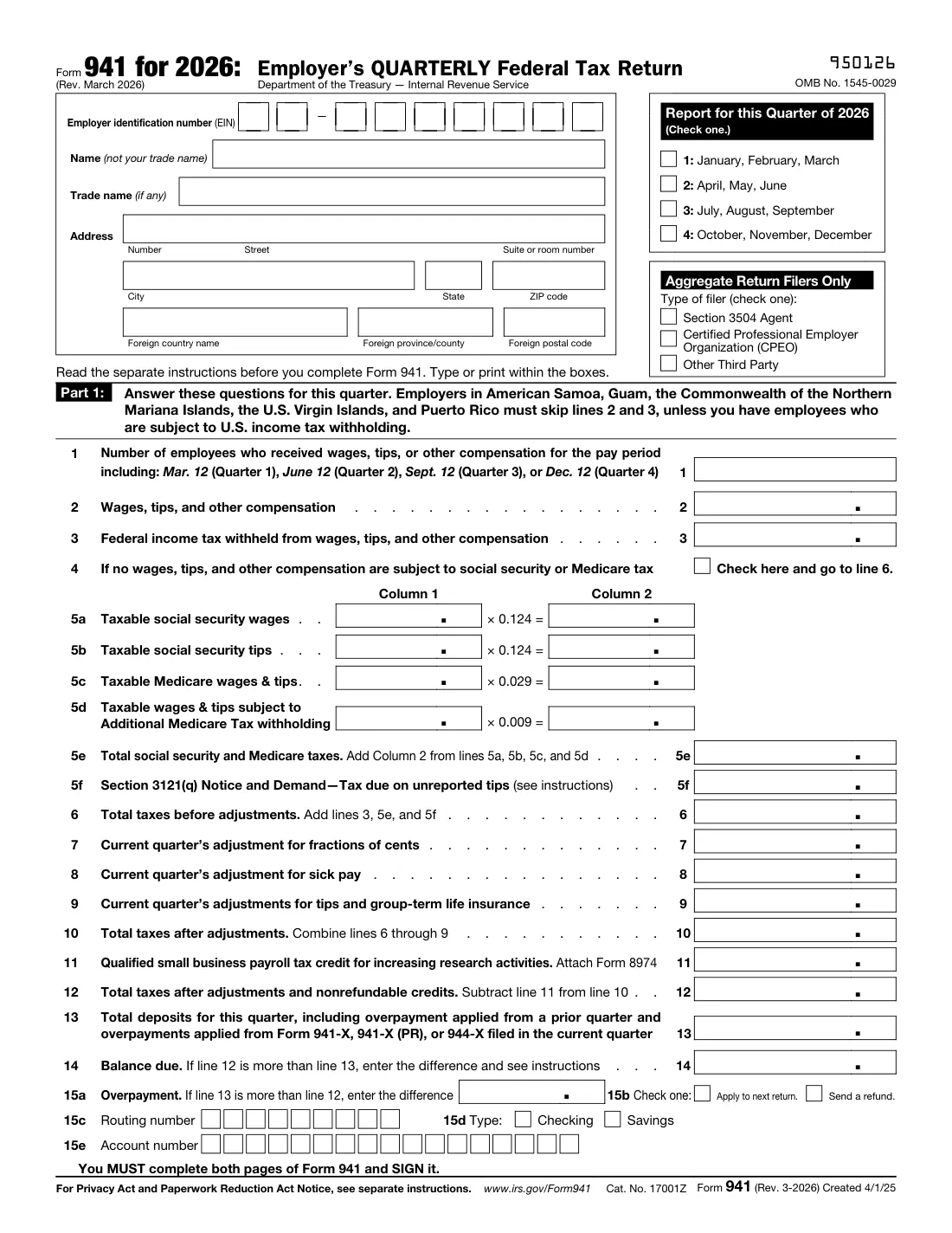
- Business information: Enter your EIN and the legal business name you used when you applied for it, adding a trade name only if it differs, and repeat your name and EIN at the top of page 2. Don't use an SSN or ITIN. If you haven't received your EIN by the due date, file a paper return and write "Applied For" with the date you applied.
- Report for this Quarter
- Quarter checkbox: Check one box for the quarter you are reporting. It must match the quarter on any attached Schedule B or Schedule R.
- Aggregate Return Filers Only
- Type of filer: Complete this only if you file one Form 941 that combines several employers' amounts. Check Section 3504 Agent, Certified Professional Employer Organization (CPEO), or Other Third Party (for example, a non-certified PEO). Section 3504 agents and CPEOs must attach Schedule R.
Part 1: Answer These Questions for This Quarter
Employers in American Samoa, Guam, the Northern Mariana Islands, the U.S. Virgin Islands, and Puerto Rico skip lines 2 and 3 unless they have employees subject to U.S. income tax withholding.
- Line 1
- Number of employees: Enter the number of employees on your payroll for the pay period that includes March 12, June 12, September 12, or December 12, depending on the quarter. Don't count household employees, farm employees, pensioners, employees in nonpay status, or active members of the U.S. Armed Forces.
- Line 2
- Wages, tips, and other compensation: Enter the amounts that would also go in box 1 of your employees' Forms W-2. Include sick pay paid by your agent.
- Line 3
- Federal income tax withheld: Enter the federal income tax you withheld, or were required to withhold, from this quarter's wages, tips, taxable fringe benefits, and supplemental unemployment compensation benefits. Don't include income tax withheld by a third-party payer of sick pay.
- Line 4
- No social security or Medicare tax: Check this box only if none of the pay on line 2 is subject to social security or Medicare tax, then go to line 6. Otherwise, leave it blank.
- Lines 5a and 5b
- Taxable social security wages and tips: In column 1, enter wages, sick pay, and taxable fringe benefits subject to social security tax (5a) and the tips employees reported to you (5b), then multiply each by 0.124. For 2026, stop including an employee's pay once their wages and tips reach $184,500 for the year.
- Line 5c
- Taxable Medicare wages & tips: Enter all wages, tips, sick pay, and taxable fringe benefits subject to Medicare tax, and multiply by 0.029. There is no wage limit for Medicare tax.
- Line 5d
- Taxable wages & tips subject to Additional Medicare Tax withholding: Enter wages and tips subject to Additional Medicare Tax withholding, which starts in the pay period in which you pay an employee more than $200,000 for the calendar year. Multiply by 0.009. There is no employer share of this tax.
- Line 5e
- Total social security and Medicare taxes: Add the column 2 amounts from lines 5a, 5b, 5c, and 5d.
- Line 5f
- Section 3121(q) Notice and Demand: Enter the tax shown on a Section 3121(q) Notice and Demand, which the IRS sends to tell you the tax due on tips your employees didn't report or underreported. Leave it blank if you didn't receive one.
- Line 6
- Total taxes before adjustments: Add lines 3, 5e, and 5f.
- Lines 7 to 9
- Current quarter's adjustments: Line 7 adjusts for fractions of cents from rounding, line 8 for sick pay when a third-party payer withheld and deposited the employee share, and line 9 for the uncollected employee share of social security and Medicare taxes on tips and group-term life insurance. Show decreases with a minus sign, for example -10.59.
- Line 10
- Total taxes after adjustments: Combine lines 6 through 9.
- Line 11
- Qualified small business payroll tax credit: Enter the credit for increasing research activities from Form 8974 (line 12 or, if applicable, line 17), and attach Form 8974.
- Line 12
- Total taxes after adjustments and nonrefundable credits: Subtract line 11 from line 10. This amount can't be less than zero, and it decides which box you check on line 16.
- Line 13
- Total deposits for this quarter: Enter the deposits you made for this quarter, plus any overpayment applied from a prior quarter and any overpayment applied from Form 941-X, 941-X (PR), or 944-X filed in this quarter.
- Line 14
- Balance due: If line 12 is more than line 13, enter the difference. Never make an entry on both line 14 and line 15a. If you were required to make deposits, pay this balance by electronic funds transfer.
- Lines 15a to 15e
- Overpayment: If line 13 is more than line 12, enter the difference on line 15a, then check one box on line 15b to apply it to your next return or get a refund; if you check neither or both, the IRS generally applies it to your next return. For a refund by direct deposit, enter your routing number, account type, and account number on lines 15c to 15e.
Part 2: Tell Us About Your Deposit Schedule and Tax Liability
Line 16 shows the tax you owed, not the deposits you made. Record each month's liability based on the dates you paid wages.
- Line 16
- Tax liability for the quarter: Check the first box if line 12 is less than $2,500 on this return or the prior quarter's return and you didn't incur a $100,000 next-day deposit obligation. Check the second box if you were a monthly schedule depositor for the whole quarter and enter your liability for each month, which must total line 12. Check the third box if you were a semiweekly schedule depositor for any part of the quarter and attach Schedule B (Form 941).
Part 3: Tell Us About Your Business
Answer only the questions that apply to your business. Otherwise, leave them blank.
- Line 17
- Business closed or stopped paying wages: Check this box if you went out of business or stopped paying wages, and enter the final date you paid wages. Attach a statement with the name of the person keeping the payroll records and the address where they will be kept.
- Line 18
- Seasonal employer: Check this box if you hire employees seasonally and don't have to file a return for every quarter. You must check it on every Form 941 you file, or the IRS will expect a return for each quarter.
Part 4: May We Speak With Your Third-Party Designee?
- Part 4
- Third-party designee: Check Yes to let an employee, paid preparer, or other person discuss this return with the IRS, and enter that person's name, phone number, and a five-digit PIN they choose. Name a specific person, not a firm. The authorization ends 1 year after the return's due date, without regard to extensions.
Part 5: Sign Here
- Part 5
- Signature and paid preparer: Sign, then print your name, title, the date, and your best daytime phone. The owner signs for a sole proprietorship, the president, vice president, or another authorized principal officer for a corporation, a responsible and duly authorized partner, member, or officer for a partnership, and the fiduciary for a trust or estate. A paid preparer who isn't your employee must complete the Paid Preparer Use Only section.
Tips for Filling Out the 941 Form
- Use the version for the quarter and year you are reporting.
- The tax you deposited during the quarter should match the total tax on the return.
- Very small employers may be told to file Form 944 once a year instead.
Fill Out Form 941 Online
The official form opens with its fields ready to type in. Free, no sign-up, no watermark.
Official PDF on irs.govGot Questions?
When is Form 941 due?
By the last day of the month after each quarter ends: April 30, July 31, October 31 and January 31.
Do I have to file Form 941 for a quarter when I paid no wages?
Generally, yes. After you file your first Form 941, you must file for every quarter, even if you have no taxes to report, unless you filed a final return, you're a seasonal employer who checks line 18, or another exception in the instructions applies.
Can I pay my balance due with the return instead of depositing it?
Only in limited cases: when line 12 for this or the prior quarter is less than $2,500, you had no $100,000 next-day deposit obligation, and you pay in full with a timely filed return, or when you're a monthly schedule depositor paying under the accuracy of deposits rule. Otherwise, you must deposit by electronic funds transfer, such as EFTPS, IRS Direct Pay, or your IRS business tax account. If you do pay with the return by check or money order, include Form 941-V.
How do I know if I'm a monthly or semiweekly schedule depositor?
It depends on the total tax you reported on Form 941 during the lookback period, which for 2026 runs from July 1, 2024, to June 30, 2025. If you reported $50,000 or less, you're a monthly schedule depositor; if you reported more, you're a semiweekly schedule depositor. If you filed Form 944 in 2024 or 2025, your lookback period is calendar year 2024.
Is there extra time to file if I deposited all my taxes on time?
Yes. If you made timely deposits in full payment of your taxes for the quarter, you may file by the 10th day of the second month after the quarter ends, for example May 10 for the first quarter.
Can I fill out Form 941 online for free?
Yes. Click Fill Form and Form 941 opens in our editor with its 116 fields ready to type in. When you are done, download it as a PDF, Word file or image. There is no account to create and no watermark.
Is this the official Form 941?
Yes. It is the official PDF from the IRS website (Rev. March 2026), with its own fillable fields. Forms are updated from time to time, so check the version on the IRS website before you file.
PDFezy Reviews
No reviews yet. Used this form? Tell others how it went.