I-9 Form Guide
Form I-9 is completed for every person hired to work in the United States. The employee fills in Section 1 with their details and citizenship or immigration status. The employer fills in Section 2 after looking at the employee's identity and work authorization documents. The lists of acceptable documents are part of the form.
How to Fill Out a I-9 Form?
- 1Click Fill Form. Form I-9 opens in our editor, with its fillable fields shown in blue.
- 2Click a field to type, tick the boxes that apply, or add text, check marks and dates anywhere on the page.
- 3Click Download, choose PDF, Word or an image, name the file and save it.
What Is the I-9 Form Used For?
Form I-9 is the record an employer keeps to show it checked a worker's identity and permission to work in the United States. It applies to every new employee, US citizens and noncitizens alike. Besides the two main sections, the form has two supplements that cover help from a preparer or translator and later changes such as rehires and expiring work authorization.
- Recording a new employee's identity and work authorization when the job starts
- Writing down which acceptable documents the employee chose to show
- Certifying anyone who helped the employee fill in or translate Section 1 (Supplement A)
- Reverifying an employee whose work authorization or document has expired (Supplement B)
- Recording a rehire or a legal name change for an employee (Supplement B)
Who fills it in
Every new employee (Section 1) and their employer (Section 2).
Where it goes
The employer keeps it on file. It is not sent to USCIS unless an official asks to see it.
When Might a New Form I-9 Not Be Needed?
The instructions define an employee as a person who works in the United States for wages or other pay. Unpaid volunteers, independent contractors, and people doing certain casual domestic work are not counted as employees for Form I-9 purposes.
If you rehire someone within three years of the date their original Form I-9 was completed, you may record the rehire on Supplement B of that form instead of starting a new one. If you rehire them more than three years after their first I-9 was completed, a new Form I-9 is required. Supplement A is only needed when someone helped the employee with Section 1.
What If the Employee's Information Changes Later?
When an employee's work authorization or List A or List C document expires, the employer reverifies on Supplement B. This is due by the earlier of the expiration date entered in Section 1 or the expiration date of the List A or List C document recorded in Section 2. The employee picks any acceptable List A or List C document, and it does not have to be the same type as before. Employers should not reverify US citizens, noncitizen nationals, or permanent residents who showed a Permanent Resident Card, and List B documents are never reverified.
A legal name change can be recorded in the New Name fields of Supplement B. If an employee first showed a receipt, the employer later records the replacement document in the Additional Information box and initials and dates the note. An employee of an E-Verify employer who is still waiting for a Social Security number adds it to Section 1 once it arrives, then initials and dates the update.
Instructions for Filling Out the I-9 Form
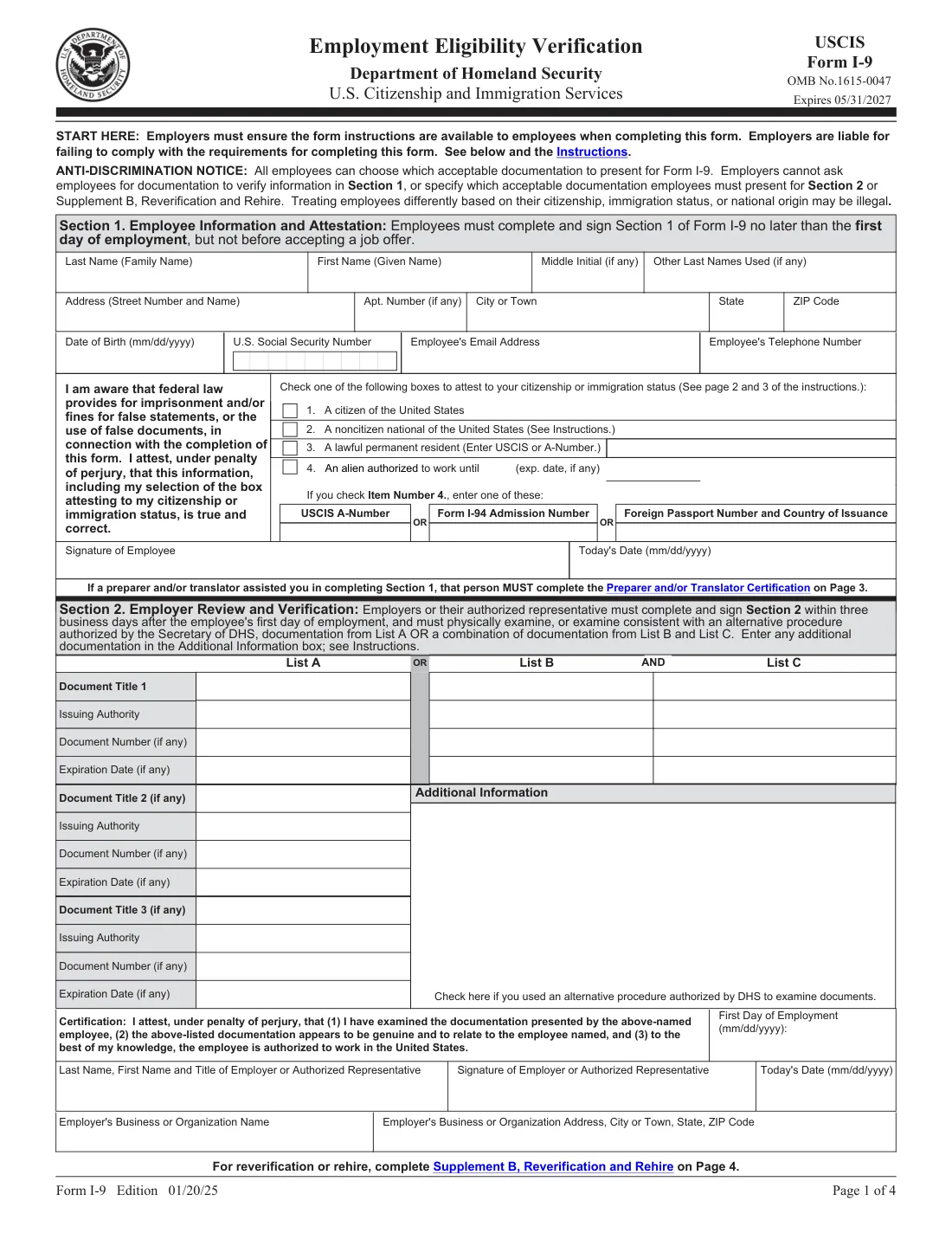
Form I-9 has two main sections and two supplements. The employee fills in Section 1, the employer fills in Section 2, and each supplement is used only when it applies. Leave any field blank that does not apply to you.
 Get form
Form I-9, 4 pages. View all pages
Section 1: Employee Information and Attestation
The employee fills in and signs this section. It can be done before the first day of work, but not before you accept the job offer.
- Name fields
- Last Name, First Name, Middle Initial, Other Last Names Used: Enter your current legal name and any last names you used before, including hyphens or punctuation. If you have only one name, put it in Last Name and enter Unknown as your first name.
- Address and birth date
- Address, Date of Birth: Every employee must give a complete address and a date of birth. Enter the date as mm/dd/yyyy.
- Social Security number
- U.S. Social Security Number: Giving your Social Security number is voluntary unless your employer uses E-Verify. Don't enter an Individual Taxpayer Identification Number (ITIN) here.
- Email and phone
- Employee's Email Address, Employee's Telephone Number: If your employer uses E-Verify, giving your email and phone lets you receive notices about your E-Verify case.
- Boxes 1 to 4
- Citizenship or immigration status: Check exactly one box. Conditional residents choose box 3. Asylees and refugees choose box 4, not box 3.
- Box 3 and Box 4 details
- A-Number, Form I-94 Admission Number, or foreign passport: Box 3 needs your USCIS Number or A-Number. Box 4 needs the date your work authorization expires (enter N/A if it has none) plus one of these: your A-Number, your Form I-94 Admission Number, or your foreign passport number and issuing country.
- Signature
- Signature of Employee, Today's Date: Sign and enter the date you actually sign. The instructions say not to back-date it. If anyone helped you, they must complete Supplement A.
Section 2: Employer Review and Verification
The employer or an authorized representative fills in this section after examining the employee's original documents. The steps below are written for the employer.
- Before you start
- Review Section 1: Read the employee's Section 1 first. If anything is wrong or missing, the employee corrects it and initials and dates the correction.
- List A column
- Document Title, Issuing Authority, Document Number, Expiration Date: Record a List A document in the first row. Some List A documents only count together, such as a foreign passport with a Form I-94, so use the second and third rows for those.
- List B and List C columns
- Identity and work authorization documents: If the employee shows one List B document and one List C document instead, record each in its own column. Don't ask for a List A document in that case.
- Additional Information
- Additional Information box: Use this box for extra documents and for later updates, and initial and date each note. You may also add optional details, such as an E-Verify case number or a termination date.
- Alternative procedure box
- Check here if you used an alternative procedure authorized by DHS to examine documents: Check this box if you examined the documents using a procedure authorized by DHS instead of examining them in person. Leave it blank otherwise.
- First Day of Employment
- First Day of Employment (mm/dd/yyyy): Enter the date the employee began working for pay.
- Certification
- Employer name, title, signature, business name and address: Enter the name and title of the person who examined the documents, sign and date, and add the business or organization name and address.
Supplement A: Preparer and/or Translator Certification for Section 1
Use this page only if someone helped the employee fill in or translate Section 1.
- Top of page
- Employee's name from Section 1: The preparer or translator enters the employee's name at the top, as it appears in Section 1.
- Certification areas
- Signature, date, name and address: Each helper signs and dates a separate certification area and adds their own name and address. There is no limit on how many people can help. The employer keeps this page with the employee's Form I-9.
Supplement B: Reverification and Rehire
The employer uses this page, which replaced the old Section 3, for reverification, a rehire, or a legal name change.
- Top of page
- Employee's name from Section 1: Enter the employee's name from Section 1 at the top of each Supplement B page you use.
- Date of Rehire and New Name
- Rehire date and new name: Enter the rehire date if this is a rehire, and any new legal name the employee reports.
- Reverification
- Document Title, Document Number, Expiration Date: If reverification is needed, record the List A or List C document the employee chose to show.
- Signature and notes
- Employer name, signature, date, Additional Information: Sign and date each section you complete, and use a new section for each reverification or rehire. Check the box if you used a DHS-authorized alternative procedure, and initial and date any notes.
Tips for Filling Out the I-9 Form
- The employee completes Section 1 no later than their first day of work.
- The employer completes Section 2 within 3 business days of the employee's first day of work.
- The employee chooses which acceptable documents to show. The employer can't ask for specific ones.
Fill Out Form I-9 Online
The official form opens with its fields ready to type in. Free, no sign-up, no watermark.
Official PDF on uscis.govGot Questions?
Do I send Form I-9 to USCIS?
No. Employers keep each I-9 on file and show it only when an inspector asks for it.
Which documents can an employee show?
One document from List A, or one from List B together with one from List C. The lists are on the last page of the form.
How long must an employer keep a completed Form I-9?
For as long as the person works for you. After employment ends, keep it until 1 year after the end date or 3 years after the first day of work, whichever is later.
Can an employee show a photocopy of a document?
No. The employee must show original, unexpired documents, and the only photocopy accepted is a certified copy of a birth certificate. A document extended by the agency that issued it counts as unexpired.
Can my employer make copies of my documents?
Yes, an employer may choose to copy them but must give the originals back to you. Any copies must be kept with your Form I-9.
Can Form I-9 be completed and stored electronically?
Yes. The instructions say Form I-9 may be created, signed, and kept electronically, as long as the employer follows DHS rules at 8 CFR 274a.2.
Can I fill out Form I-9 online for free?
Yes. Click Fill Form and Form I-9 opens in our editor with its 130 fields ready to type in. When you are done, download it as a PDF, Word file or image. There is no account to create and no watermark.
Is this the official Form I-9?
Yes. It is the official PDF from the USCIS website (Edition 01/20/25), with its own fillable fields. Forms are updated from time to time, so check the version on the USCIS website before you file.
PDFezy Reviews
No reviews yet. Used this form? Tell others how it went.