2848 Form Guide
Form 2848 lets you name an attorney, certified public accountant, enrolled agent or another eligible person to represent you before the IRS for the tax matters and years you list. Your representative can speak to the IRS for you and sign some documents.
How to Fill Out a 2848 Form?
- 1Click Fill Form. Form 2848 opens in our editor, with its fillable fields shown in blue.
- 2Click a field to type, tick the boxes that apply, or add text, check marks and dates anywhere on the page.
- 3Click Download, choose PDF, Word or an image, name the file and save it.
What Is the 2848 Form Used For?
Form 2848 is the IRS power of attorney form. It names one or more individuals who are eligible to practice before the IRS and lets them act for you on the specific tax matters and periods you list. In most cases the IRS records it on its Centralized Authorization File (CAF), so IRS staff can quickly see who may act for you. Some powers, such as signing your return, are included only if you add them on purpose.
- Represent you for the tax matters, form numbers and years you list on line 3.
- Inspect and receive your confidential tax information for those matters.
- Sign agreements, consents, waivers and similar documents for you.
- Receive copies of IRS notices sent to you (no more than two representatives).
- Handle one-time matters not recorded on the CAF, such as an EIN application or a private letter ruling request.
Who fills it in
Taxpayers and the representatives they appoint.
Where it goes
Submit it to the IRS online, by fax or by mail, as the instructions explain.
When Might You Not Need Form 2848?
If you are a fiduciary, such as a trustee, executor, administrator, receiver or guardian, you stand in the taxpayer's place and act as the taxpayer, not as a representative. Use Form 56 to tell the IRS about that relationship. As the fiduciary, you can still sign a Form 2848 to name an eligible representative for the person or entity.
Form 2848 also won't change your address with the IRS (use Form 8822 or 8822-B for that), and it is not used to designate a partnership representative under the centralized partnership audit regime. If an unenrolled return preparer doesn't meet the rules to represent you, you can still let them see your tax information with Form 8821.
How Do You Revoke or Change a Form 2848?
To revoke a power of attorney without naming a new representative, write "REVOKE" across the top of the first page, sign and date it below that word, and mail or fax the copy to the IRS using the Where To File Chart in the instructions. If it covers a specific matter, send it to the IRS office handling that matter. If you no longer have a copy, send a signed and dated statement listing the matters and years or periods and the name and address of each representative whose authority you are revoking.
A representative who wants to withdraw follows the same steps but writes "WITHDRAW" instead. If only the representative's address changes, you don't need a new Form 2848; the representative can send the IRS a signed written notice with the new details. If you file a new Form 2848 naming someone else, it automatically revokes earlier ones for the same matters and periods unless you check line 6.
Instructions for Filling Out the 2848 Form
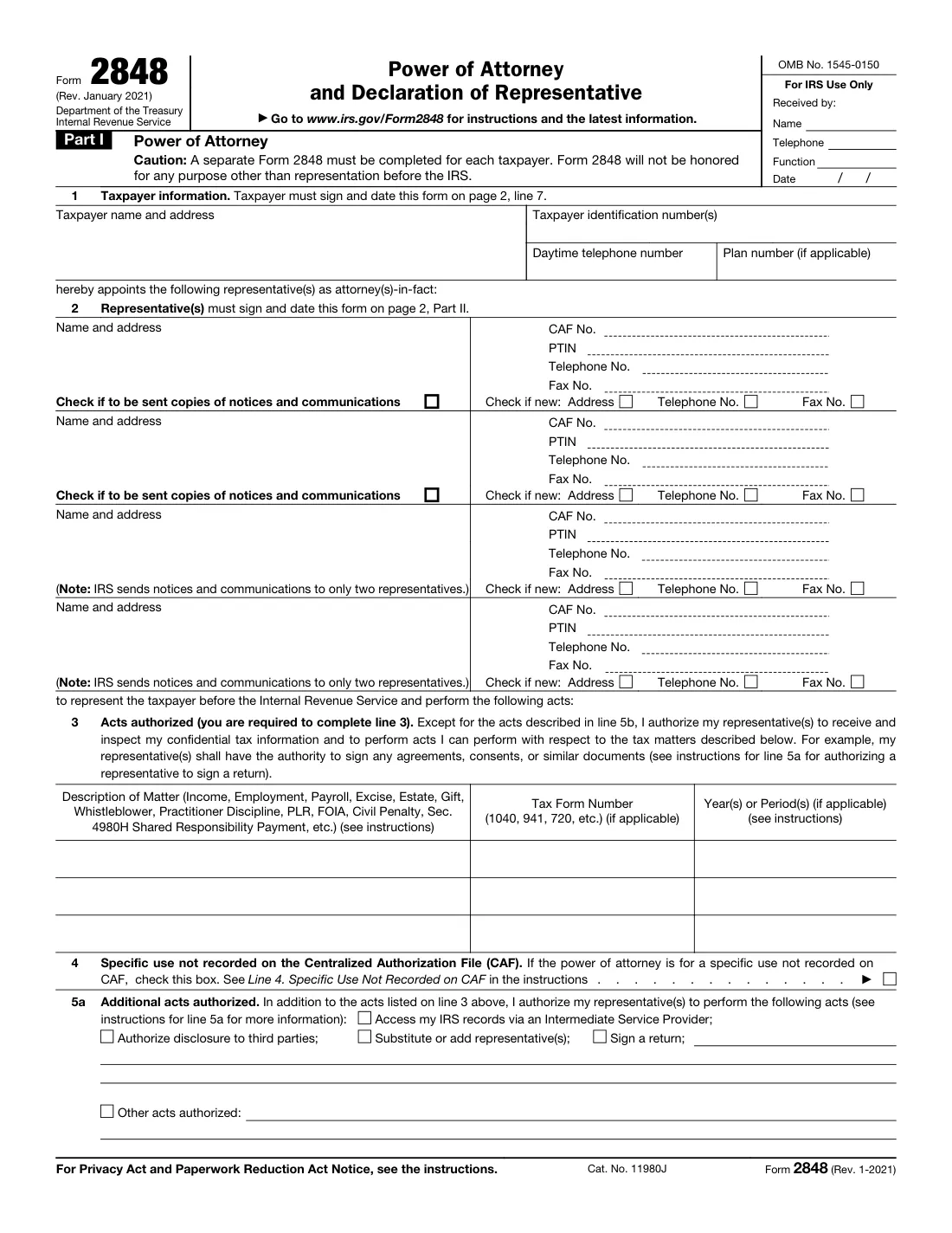
Use a separate Form 2848 for each taxpayer. The taxpayer completes Part I and signs on line 7, and each representative completes and signs Part II.
 Get form
Form 2848, 2 pages. View all pages
Part I: Power of Attorney
- Line 1
- Taxpayer information: Enter your name, address, taxpayer identification number (SSN, ITIN or EIN), daytime phone and, for an employee plan, the plan number. If you have a sole proprietorship and want help with both personal and business matters, enter your SSN and your business EIN. Don't enter your representative's address here.
- Line 2
- Representative(s): Enter each representative's full name, mailing address, nine-digit CAF number, PTIN, phone and fax. Write "None" if no CAF number has been assigned, or "applied for" if a PTIN is pending. Check the box under a name if that person should get copies of IRS notices, and check the "new" boxes if their contact details changed since the CAF number was issued.
- Line 3
- Acts authorized: This line is required. For each matter, enter a description (such as Income or Employment), the tax form number and the years or periods, for example "Income, 1040, 2022 thru 2024." Don't use general references like "All years" or "All taxes," because the IRS returns forms that do.
- Line 4
- Specific use not recorded on the CAF: Check this box only for a one-time or specific-issue authorization that the IRS does not record on the CAF, such as an EIN application, a Form 843 claim or a private letter ruling request. If you check it, mail or fax the form to the IRS office handling that matter.
- Line 5a
- Additional acts authorized: Check any extra powers you want to give: access to your records through an Intermediate Service Provider, authorizing disclosure to third parties, substituting or adding representatives, or signing a return, and list any other acts on the lines provided. Signing an income tax return is allowed only for disease or injury, a continuous absence from the US of at least 60 days before the due date, or with IRS permission for other good cause. You must also write the statement given in the instructions.
- Line 5b
- Specific acts not authorized: Representatives can never endorse or negotiate a government check for a federal tax liability or direct that payment into an account they control. Use this line to list any other acts you don't want them to perform.
- Line 6
- Retention/revocation of prior powers of attorney: A new Form 2848 automatically revokes earlier powers of attorney on file for the same matters and periods. To keep an earlier one in effect, check this box and attach a copy of it. Filing Form 2848 does not revoke a Form 8821.
- Line 7
- Taxpayer declaration and signature: Sign, date and print your name, and add your title if you sign for a business or other entity. Handwrite your signature if you file by mail or fax, because electronic signatures are accepted only through online submission. Spouses who filed jointly each need their own Form 2848.
Part II: Declaration of Representative
Each representative signs here in the same order they are listed on line 2. If this part isn't completed, signed and dated, the IRS returns the form.
- Designation
- Letter a to r: Enter the letter for your status, such as a for attorney, b for CPA, c for enrolled agent or f for family member. Unenrolled return preparers (h) have limited representation rights. Qualifying students or law graduates (k) enter "LITC" or "STCP" and attach their authorization letter from the Taxpayer Advocate Service.
- Licensing jurisdiction
- State or other licensing authority: Attorneys and CPAs enter the two-letter abbreviation of the state where they are admitted or licensed. Officers, full-time employees and family members (d to f) enter their title, position or relationship to the taxpayer in this column instead.
- Bar, license or enrollment number
- License or enrollment details: Enter your bar, license or certification number, if any, or your enrollment card number if you are an enrolled agent, enrolled actuary or enrolled retirement plan agent. Unenrolled return preparers enter their PTIN.
- Signature and date
- Representative's signature: Sign and date the declaration. If the taxpayer signed first, the representative must sign within 45 days of the taxpayer's signature date, or 60 days for taxpayers living abroad.
Tips for Filling Out the 2848 Form
- List each tax matter, form number and year or period the representative can handle.
- The representative completes Part II with their designation and license details.
- To let someone only see your tax information, without representing you, use Form 8821.
Fill Out Form 2848 Online
The official form opens with its fields ready to type in. Free, no sign-up, no watermark.
Official PDF on irs.govGot Questions?
What is the difference between Form 2848 and Form 8821?
Form 2848 lets someone represent you and act for you. Form 8821 only lets them receive and look at your tax information.
Can I sign Form 2848 electronically?
Yes, but only if the form is submitted online at IRS.gov/Submit2848, which requires a Secure Access account. A Form 2848 sent by mail or fax must have a handwritten signature.
My spouse and I filed a joint return. Can we use one Form 2848?
No. Each spouse must file a separate Form 2848, even if you are both appointing the same representative.
How many representatives can I name?
The form has room for four. To name more, write "See attached for additional representatives" to the right of line 2 and attach another Form 2848. The IRS sends copies of notices to no more than two representatives for the same matter.
Can I list future tax years on line 3?
Yes. However, the IRS won't record on the CAF any future years or periods that go more than 3 years past December 31 of the year it receives the form.
Can I fill out Form 2848 online for free?
Yes. Click Fill Form and Form 2848 opens in our editor with its 92 fields ready to type in. When you are done, download it as a PDF, Word file or image. There is no account to create and no watermark.
Is this the official Form 2848?
Yes. It is the official PDF from the IRS website (Rev. January 2021), with its own fillable fields. Forms are updated from time to time, so check the version on the IRS website before you file.
PDFezy Reviews
No reviews yet. Used this form? Tell others how it went.